Categories
Digital Marketing

How SEOs and UX Designers Can Work Better Together — Whiteboard Friday

This is the final installment of the three-part series of Whiteboard Fridays with Helen Pollitt on how to work better with folks within your company.

There are a lot of similarities between SEOs and UX designers, and we often have the same goals. How can we work to understand more of the UX designers’ priorities and help to communicate our priorities to them? Learn all about how SEOs and UX designers can work better together in this edition of Whiteboard Friday.

Digital whiteboard on the topic 'How SEO's and UX Designers Can Work Better Together'

Click on the whiteboard image above to open a high resolution version in a new tab!

Video Transcription

Hi, I’m Helen, head of SEO at Car & Classic, and today we are looking at how SEOs and UX designers can work better together. Now, UX designers are a lot like SEOs. No one in the office quite understands their specialism. No one really knows whether they should be in the engineering department, the product team, the marketing team, and they too have probably given up trying to explain their jobs to their family members.

So if there’s a lot of similarities between SEO and UX designers, why do we need to have a Whiteboard Friday on how to work better with them? Well, on first blush, actually there’s a lot of places that SEO and UX actually overlaps, but oftentimes we’re kind of in disagreement about how things should progress. You have spent days looking at the best links to have on your top menu navigation, you have carefully sculpted the pages that should be linked to from that great source of links, and then the UX designer comes to the meeting and asks to cut their menu in half.

You’re there terrified about your internal link equity, and they’re there terrified that none of the users can ever find the stuff that they’re looking for on your website. But actually, oftentimes we have the same end goal. We want visitors to get to the website and be able to access the pages and the products and the stuff that’s on that site well and enjoy the process of being there.

So actually, our end goals are fairly similar. So how can we work to understand more of the UX designers’ priorities and help to communicate our priorities to them?

Understand UX and design principles

Tips to understand UX principles

Well, first off, I would suggest we need to start by understanding some UX and design principles. Get familiar with things like visual hierarchy and context and understand what it is that UX designers are looking to do when they are making changes to the website.

If you do that and upskill yourself, then you are going to find you understand where they’re coming from a lot more, and that’s going to help you to communicate the reasons why something could be a great idea from an SEO perspective and then find the compromises when it’s not going to be. Also, talk to them, get their wish lists of things that they want to see happen on the website. Now, this is easier to do if you work in-house because you can just go and talk to your UX designers.

If you work freelance or for an agency, it’s a bit harder to do. But if you go and ask your client if you can spend a day with their UX design team, you’re probably going to win a lot of favors from them, and it could be a day out of the office, so win-win. But when you’ve got an idea of what their wish list is, all the stuff that they would love to see happen to the website, you are better equipped to then tell them about things like issues and problems that there might be.

So for example, if the UX designer says that they want to take your 20,000 product e-commerce store and distill it down to a single web page, you can tell them why that might be an issue, and if it goes ahead, well, at least the redirect mapping will be simple. You also should get yourself involved in the kind of conversations that your UX designers are having. So go to the meetings that they’re in.

Get involved in product team decisions, so that you are there when these kind of things are first being suggested and talked about. So if there is anyone talking about the possibility of changing your website and making it into a single web page, you can be there saying, “Actually, that’s probably not the best idea,” before the plans and things that get set into motion are too far along.

Train your UX team in SEO

Tips to train the UX team

Next, you want to look at training your UX team.

So this is really important because you want to make sure that the UX team understands SEO principles as well as you understanding UX principles. So talk about things like navigation elements. Why are they important to SEO? What are the risks associated with them removing things from the navigation? What is link mapping? What is it all about the hierarchy of the website?

Try to explain to them these concepts so they understand why you might be saying no to some of their recommendations, and again, you can try to compromise and find a solution. That goes for links in general. Actually, the way that the UX team might want to implement a link and make it work could be great for users, it might look great, but it could have some underlying SEO issues with it. So talk about what SEO needs from links, what makes a link SEO friendly and allows the bots to crawl it, so that the UX team can make decisions and recommendations based on that data.

Talk to them about things like Core Web Vitals and actually the overlap between what we’re looking for from an SEO perspective and actually what they want for users, because a lot of the time that’s quite aligned. So for example, explain how having a banner load in after the rest of the page is loaded could be a problem for cumulative layout shift, and tell them that scrolling banners are always a bad idea, not necessarily because they’re any worse from an SEO perspective, but they just look terrible, and I’d like them to just stop if they could.

Talk to them about things like copy and why we do need copy on a page. We don’t need copy on every page because not every page is important from an SEO perspective, but for those that are, we do need to have copy. But that doesn’t mean we have to have reams and reams of copy that a user has to scroll through on their mobile before they actually get to the list of products that you sell. That there are ways that we can implement copy on a page that’s a lot more friendly for users.

So we can look at things like tabs or concertinas, things that reveal the copy when an interaction is made. That means that users aren’t having to look at all of the history of somebody’s recipe and why it was that they decided to bake an apple crumble because of their grandmother and how their grandmother loved apples and that it fell from an apple tree, and you know all the kind of good stuff that you always have to scroll through when you’re just trying to find a simple recipe on these recipe websites.

You don’t have to do that in order for SEO to be considered for that page. You can look at things like teaching them about the risks of them making a change to a website. So yes, okay, maybe we do want to redesign the nav. But what do we need to do as SEOs? What do we need to understand before we can say, “Yeah, let’s do it”? So talk to them about the risks involved with them making simple changes.

For them, they might think that just changing the wording on a button won’t have any impact, but for us, we know that anchor text does have some importance. So how can we educate our UX designers so they understand that when they’re making changes, some of them will need to be run past the SEO team first? Finally, why are we always going on about designing things mobile first? Explain that to your team so they understand why you really need to see how things are going to look on a mobile design as well as a desktop, because actually we need to see if there’s parity between the two.

We need to see whether the mobile version of the website has everything that it needs for Google to understand the context and the relevancy of the page. That’s really important, but it’s not always something that the UX team have had communicated to them. So make sure you do that.

Create guidelines for your UX team

Tips to create guidelines for your UX team

Next, try to create some guidelines for your UX team. So rather than continually telling them all these things, perhaps you can actually document it so they have a source to go back to.

Look at how they manage to document their own internal design decisions. So if they have a way of doing things, how do they document it? Is it in a central workspace? Or do they have some guidelines that they actually send out to every member of the team? How do they document them? See if you can start copying that method and making sure your UX designers are familiar with the ways that you need things to happen on the website for SEO reasons.

Also, maybe you can input on their design system because most websites will have a set way of doing things from a design perspective, and some of those might have some SEO impacts, things like links and buttons and that kind of stuff. So can you actually have a say in the design system that’s been created for the website?

Get buy-in from your UX designers

Tips to get buy-in from your UX designers

Lastly, you want to get buy-in from your UX designers so that they enjoy working with you and they look forward to hearing your recommendations and thoughts, and they don’t constantly see you as a source of no.

So show them where SEO helps UX. So things like usability, load speed, how actually if a search engine is able to get through your website, well, it probably means a user is able to get through the web website well as well. So you’re helping the UX end goal by making sure that SEO is incorporated into those kind of decisions. Talk to them about the importance of conversion rate for SEO.

That actually, we don’t just want to see traffic land on a web page and we don’t care where it goes after that. We are just as concerned about how users use a website as they are. We want to make sure that they are able to complete the goals on the website, that they can buy the product, that they can find the information, because that’s essentially why we’ve driven traffic to that page in the first place. So do try and reinforce that you and your UX team have got very similar goals.

Finally, give them access to data and try and share some of the data that they have as well, because they will be monitoring things. They’ll be looking at stuff that we just don’t have the software to monitor. So can you share data with each other that helps both sides understand a little bit more about what’s going on? Thank you so much for listening.

I’m going to go off and try to find a way of explaining my job to my family members, and hopefully I can tell that to the UX team as well.

Video transcription by Speechpad.com

source https://moz.com/blog/seos-and-ux-designers-working-together-whiteboard-friday

Categories
Digital Marketing

How to Get More Local Business Reviews from Travelers

town welcome sign highlights available local businesses
Image credit: JPreisler.com

Call me a hopeless romantic, but I delight in extending the enjoyment of travel by writing reviews of the places I’ve been after returning home. It’s almost like typing a mini travelog, remembering the new experiences, for good or not-so-good, I had along the road.

I know that when I write a positive review of a local business or public amenity, it will give a lift to online reputation, rankings, and revenue. If I write a judicious critique of something that wasn’t so great, it can help business owners make improvements that should build up their metrics and success over time. And while pursuit of the great outdoors is often the search for silence, quiet is the one thing no local business owner should ever hope for in their online review profiles.

If you and your town depend on tourism for part of your economic health, today’s column is for you. I’ve got an original poll, stats, and tips to help your local business earn more reviews from travelers.

How many reviews do travelers write?

painting of Jane Austen writing about her travels and experiences at her desk
Image credit: MiriamEllis.com

Elizabeth was delighted. She had never seen a place where nature had done more, or where natural beauty had been so little counteracted by an awkward taste.” – Jane Austen, Pride and Prejudice

For a long time, I’ve wanted to know if Jane Austen and I were alone in loving to write about our travels through Derbyshire and, you know, Peanut, California. Does anyone else re-live the inns and parks and restaurants and shops and public places visited like we do, by jotting it all down, I wondered. So, I did what any lady of wit and intelligence would do and took a Twitter poll to ask how many local business reviews other people write as the result of a trip. Thank you to everyone who took the time to respond so that we can all see the data:

screenshot of Twitter poll showing that 47.5% of travelers don't leave any reviews

It’s good to know that 37.5% of people write at least 1-3 reviews as a result of travel, and that 13.8% find even more pleasure in writing as many as 4-6 reviews, and those who find themselves equal to penning 7-10 reviews are praiseworthy local business supporters, indeed. All told, 52.6% of wayfarers write at least some reviews. All good news!

But on the other hand, the fact that nearly half (47.5%) of vacationers and travelers write zero reviews about their experiences on the road or abroad is ill news, because of the lost opportunity this represents for local brands. In fact, it’s not just ill news…it’s familiar ill news. As we shall see.

Why don’t travelers write reviews? Stats tell the story.

photo of man in hammock with laptop at a resort while woman looks on
Image credit: Nik Gaffney

“Sometimes you will never know the value of a moment until it becomes a memory.” – Doctor Seuss

From a previous large-scale Moz survey, we know that only 14% of US adults never write reviews and that is quite a different figure than the 47.5% of travelers who never write reviews:

infographic showing that only 14% of US adults never write local business reviews

We also know that over half of US adults will either always or usually leave a review if asked to do so by the local business:

infographic showing that if asked, 51% of customers will always or usually write a review

But, unfortunately, 39% of respondents simply haven’t been asked by anyone to review a local business in the past five years. That number deserves its own graphic:

graphic highlighting that in the past 5 years, 39% of customers have not received a single review request from a local business

So not asking customers, including travelers, to write reviews could be a significant reason why your business isn’t getting the maximum benefits it could be enjoying from earning more reviews. But do you know what the #1 reason is that visitors to your town aren’t reviewing you on the road or when they get back home again? Forgetfulness.

infographic showing that the #1 reason people don't write reviews is that they simply forget to when they have free time

The dominant 38% of respondents simply don’t remember to write you a review when they have free time. You can easily imagine this scenario. The vacationer has returned from touring Derbyshire (or Peanut) and they are sunburned, and their offspring and dogs are covered in sand, and they have to unpack the traveling coach, and they discover the power was shut off in their absence and now their refrigerator smells otherworldly. It’s probably the last thing on their mind right now, or even this week, to sit down and review the B&Bs, shops, state parks, and carriage rental service they enjoyed on the trip.

In order to win reviews from passers-by, your best bet will be to capture their text number or email address at the time of service and remind them.

But when should you do that?

Thank you Near Media (and university researchers) for answering my question

highway sign stating

It’s been a standard best practice recommendation for many years to send local business review requests shortly after the time of service. Common wisdom has asserted that you should collect a customer’s email address or text line when they make a purchase from you and then follow up with them quickly with an email or text mentioning how much you would appreciate their review. This seems logical, but recent research from the University of Nevada and Arizona State calls this whole timeline into question. As highlighted in a must-read article from Greg Sterling and Mike Blumenthal at Near Media, this survey found that:

  • In the first 5 days following a transaction, customers leave more reviews if you don’t ask for them!

  • However, once 9 days have elapsed since the transaction, customers start leaving fewer reviews unless your business asks for them.

  • The window of time that results in the most reviews earned via solicitation appears to be between 9-14 days post-transaction.

  • The university researchers speculated that review requests that appear too quickly can feel pushy or annoying, whereas those which are received later feel like friendly reminders.

These findings are both novel and surprising, and this new suggested review request timeline strikes me as ideally adapted for businesses that depend, in part, on tourism. Travel, however much it may be enjoyed, is generally a bit of an ordeal. There are well-known memes about needing time to rest from the rest you were supposed to have on vacation.

A 9-14 day window gives visitors a recovery period, by which point they will also have strayed into the forgetfulness territory identified in Moz’s own survey. Your request in this slot could be just what is needed to remind the customer and warmly invite them to relive the good memories they made on their trip by writing them down in review format.

Near Media urges you to experiment, of course, with the behaviors and preferences of your own customers. Their activity may or may not match the findings of the university research, but to get an accurate reading on this, please look again at this statistic:

infographic showing that the #2 reason people don't leave reviews is because the process for doing so is too difficult or confusing

The #2 contributor to lack of reviews (coming in right behind forgetfulness amid busy-ness) is that the process of leaving a review is confusing and difficult. In our survey, we found that the younger your customers are, the more help they may need in leaving a review. Be sure your email or text includes instructions and a link to your Google review profile. You can get that link by looking up your business in Google (while logged into your account that governs your Google Business Profile) and then clicking on the “Ask for reviews” tab in the New Merchant Experience interface, as shown here:

screenshot of new merchant experience with the ask for reviews button highlighted

You’ll see this popup generating the link to review your business:

screenshot of new merchant experience popup containing a link to a local business review profile

You can copy that link and paste it into your texts and emails. By making it easier for customers to review you, you’ll get a more accurate picture of what the ideal time window is for requests in the community you serve.

A station wagon load of other tips for earning vacationers’ reviews

photo of vintage station wagon being packed for a vacation

In addition to experimenting with your request timeframes, give these tips a try to maximize the number of reviews your business is receiving:

  • Pour everything you’ve got into great customer service. 63% of review writers take the time to provide reviews to show appreciation for businesses that take good care of them.

  • Respond to all your reviews. The #3 reason people don’t write reviews (as shown above) is that they don’t believe the business will care enough to read their sentiment. Indicate that you care a ton by responding authentically to what other customers have written.

  • Use space in your physical premises to clearly message that you want reviews. Windows, interior and exterior walls, front desks, tables, night stands, shelves, fences, business vehicles and other surfaces can all be places where you can put up a large or small sign letting patrons know how much their review will be appreciated.

  • Use print to further your messaging. Menus, receipts, mailers, bags, and packaging can all include review requests.

  • Train staff to request reviews at their discretion. I don’t recommend making employees repeat the same message to every customer that comes through a checkout. It sounds robotic and inauthentic as the line moves along. But when valued staff are encouraged to see review opportunities in more personalized interactions, a direct request from a helpful team member to a happy customer could add to your review count over time.

  • Avoid negative reviews by ongoing management of your local business listings across the local search ecosystem. A vacation can really go sour when inaccurate information about locations, hours, and phone numbers is live on your profiles. Manually update all of your listings any time there is a change, or use a helpful service like Moz Local to update your listings across the major platforms in a few clicks.

  • Use social media for storytelling about the role reviews are playing in the success of your local business. Most reviewers are unlikely to realize on their own how profoundly aspects of reviews impact the rankings of small brands that serve local communities. By talking on social profiles about how earning new reviews might enable your business to afford some beautiful new chairs for the dining patio or switch to an electric vehicle for delivery, it makes customers’ actions a powerful part of your story. Just be careful that you are not incentivizing reviews. Don’t offer gifts, perks, or money in exchange for reviews.

  • Speaking of things not to do, never engage in any form of review spamming. 40% of customers have received requests to spam the web with ineligible reviews that violate platform guidelines and are illegal in many countries. Don’t lose customers’ precious trust and respect by engaging in review spam of any kind.

  • Don’t forget that Google is not the only review game in town. Diversify your review requests to ask customers to review you on their favorite platforms. Our survey showed that while 66% of US adults spend the most time writing reviews on Google, others spend lots of time on Yelp, Facebook, TripAdvisor, Nextdoor and a variety of additional platforms. Google has a habit of losing reviews periodically, and by having your customers’ sentiment visible in multiple online places, you’ll be sure that visitors can read about you around the web, even when your Google Business Profile is experiencing a bug.

Finally, if this article is motivating you, take some time this week to think about visitors to your town. Hospitality business owners spend part of every day strategizing around making guests welcome, and this kind of care can apply to almost any kind of business located in a town or city that hosts lots of travelers. What kind of special welcome are you offering newcomers to your community? What are you doing to make them love their time with you, want to come back to you if they are ever in your area again, tell their traveling friends and family about you, and take the time to review your business?

Maybe you offer a vacationer’s special. Maybe you have a pretty sign in your window warmly welcoming tourists and asking them to stop in to ask your staff about fun things happening in the community. Maybe it’s your shop with the bench outside for footsore walkers around your downtown, or your porch that has the dog watering station for people vacationing with their pets.

In a popular place near me, a community has signs posted asking visitors to tune their car radios to a particular station for information about the area. That’s an idea your town could take and run with, and I know listening to that station makes me have a special feeling of being considered and included in local life. Little things mean a lot.

One of the nicest aspects of local business reviews is that they are a lengthy novel rather than a short story. Whether you are operating in Derbyshire or Peanut, what you seek is a modest and ever-running stream of fresh reviews across time. Time to experiment, to try new things, to adjust your strategy on the basis of new data like we’ve seen today. 96% of US adults read reviews and 86% write them. It’s a form of content people can really enjoy under the right circumstances. With a little well-timed encouragement, more of your traveling customers will put their creative writing skills to work for your business, gifting you with better local search rankings, a persuasive reputation, and a lucrative upward trend in transactions.

Eager for more local business review tips? It is a truth universally acknowledged that Moz’s review survey is worth reading!

source https://moz.com/blog/get-more-local-business-reviews

Categories
Digital Marketing

Your GA4 Migration: 10 Things You DON’T Want to Miss

Universal Analytics is officially done collecting data. Cue one single tear running down every marketers’ cheek.

Now all of your site data will flow solely through Google Analytics 4.

Are you sure you’re ready for that? The only reason I ask is because, well, GA4 is a bit of a beast with tons of hidden settings that need to be addressed for optimal data collection.

In the admin section of GA4 you will see two columns: Account and Property. The Property column is where the majority of important setting options are hiding.

screenshot of admin section in GA4, showing an Account column and Property column

1. Timezone

Your property timezone can be set under the Property Settings section of the Property column. (Yes, this is very meta.)

This one may seem like a no-brainer, but it’s an easy one to overlook.

When you created your GA4 property, you had the option to set your timezone. If you’re anything like me, you probably just hit the “next” button.

But not so fast! You need to double check this setting.

We already know that different platforms track differently so we aren’t tracking apples to oranges, but if we aren’t even using the same time zones for reporting, well we may as well be tracking apples to cucumbers.

The TL;DR: Using the same timezone everywhere allows you to compare data a bit more easily.

2. Currency

Turns out, there is more than one thing to touch in that Property Settings section in column two.

In the same place you set up your timezone, you have the option to change your currency.

By default Google sets the currency to USD for all reporting.

Note: If you’re doing business with multiple currencies, Google will do the conversions on the backend to continue to report in USD.

screenshot of a GA4 property settings, showing where to find the timezone and currency settings

3. Enhanced measurement

Enhanced measurement is perhaps one of the biggest changes with Google Analytics 4.

If you’re not sure what enhanced measurement is, it’s essentially pre-built event tracking. Which is actually great, except when it tracks things incorrectly.

You can view all of the automatically collected events in the Data Streams section once you click on your desired data stream.

Now don’t worry, most of these events and parameters will be tracked just fine, but there are a few instances that may require additional debugging.

This most pertinent issue for users revolves around form interactions, especially for those who have the Meta pixel on their site. False form interactions tend to be triggered by Facebook pixels because Facebook uses a “form submission” to pass data from your site to theirs.

I highly suggest using the GA4 debug tool or by looking at your real time analytics to double check that the “form_destination” is correct.

screenshot showing where to find form interaction settings in GA4

Another major pain point in enhanced measurement is that it relies on site searches passing one of the following parameters into the url: q, s, search, query, keyword. Should you use a different parameter, it can be defined in this enhanced measurement section by clicking the gear icon next to the events.

4. Events

The Events section is a great place for a tracking gut check.

This is basically just a massive list of all of the events being tracked and how often they are being fired. If you don’t see your events here or the numbers seem low, you may need to go check your setup.

Also, new in GA4, you can create and modify your events directly in the platform.

If you were a destination goal type person in Universal Analytics, this is the section that allows you to create events based on page location.

Tons of other changes can be made using the modify event tool like reconciling event names, creating sub events from collected events, etc.

Screenshot of Events settings in GA4

5. Conversions

Much like the Events section, this Conversion section is the best place to do a quick gut check and make sure the most important things are being tracked on your site.

If you don’t see one of your conversions on this screen, you will need to head back to the Events sections and click the toggle to the right of the event name.

screenshot showing Conversions settings in GA4

(Yeah, it really is that easy to create conversions in GA4. Thank goodness.)

If you do see your conversions, but the numbers look odd, you may want to click the three dots to the right of the conversion to see the counting method.

By default, Google counts conversions for each event completion. However, you may only want to count conversions once per session. If that is the case, click on those three dots and change the counting method to “Once per session.”

a screenshot of counting method settings for Conversions in GA4

6. Define domains

For all of my friends out there using different domains for their stores, their courses, their main site, and/or their blog – your time has come.

The good news is, cross-domain tracking in GA4 is much easier than it was in UA. The bad news is that this is only true if you know where to find the setup widget.

To define all of your domains, navigate to Data streams > select data stream > Configure tag settings > Configure your domains.

Screenshot showing where 'Configure tag settings' can be found in GA4

Taking this step is especially important in GA4 because outbound clicks are tracked using Enhanced Measurement. Thus, not defining all of your domains can lead to false “click” counts.

7. Internal traffic

Ah, now this is a question I’ve been asked over a dozen times. Yes, you can filter out internal traffic.

To filter internal traffic by IP address, you will need to go to Data streams > select data stream > Configure tag settings > Show all > Define internal traffic.

Unfortunately, in the GA4 platform, this is currently the only way to define internal traffic.

Screenshot showing where to find internal traffic and referral settings in GA4

8. Unwanted referrals

E-commerce folks, this one’s for you.

If you’re using a third-party payment processor like Stripe or Paypal, this is a big one.

Unless you want all of your purchases to be attributed to your payment processors, you have to specify to Google that there are unwanted referrers.

If you’re not sure if you have sites you need to mark as unwanted referrals, check your Traffic Acquisition report and change the primary dimension to Session Source/Medium.

9. Custom dimensions

If you’re anything like me, and send 80% of your events using Google Tag Manager, you’re going to want to listen up!

Most of the time, people use GTM to send extra data with their events in the form of event or user parameters. GA4 does collect and process these parameters, but it DOES NOT retain this data unless you’ve defined the dimensions.

screenshot showing Event count by Event name in GA4

So if you want to be able to see your parameters, you need to create a custom dimension for each one. It’s pretty easy, you just name the dimension and select the coordinating parameter.

Screenshot showing custom dimension settings in GA4

10. Data retention

Lastly, and maybe most importantly, you are going to want to extend your data retention window.

This is perhaps one of the most important but most overlooked settings.

In the property column, you’ll navigate to Data settings > Data retention. Once you’re here you will find that by default GA4 properties are only set to retain event data for 2 months.

That’s just 60 days. That’s not even a whole season of Big Brother.

The good news is that you can change this from 2 months to 14 months with three clicks of a button.

screenshot showing data retention settings in GA4

A quick note: Any changes made under this Data settings section should be discussed with a privacy expert or lawyer. Many of these changes have the possibility to affect your compliance status with GDPR and other privacy legislation.

You’ve got this!

It seems like a lot. And it is. But you’ve got this.

GA4 is a monster, but if you’re here, you’re already tackling it. Way to go!

Now, go triple check all of those properties you created a year or two ago… We’re gonna do the same.

Brie will be speaking at MozCon 2023 this August in Seattle! Join us for inspiring sessions with our incredible lineup of speakers. 

We hope you’re as excited as we are for August 7th and 8th to hurry up and get here. And again, if you haven’t grabbed your ticket yet and need help making a case we have a handy template to convince your boss!

Register for MozCon

MozCon SEO conference 90%  sold out

source https://moz.com/blog/ga4-things-you-dont-want-to-miss

Categories
Digital Marketing

How SEOs and Content Writers Can Work Better Together — Whiteboard Friday

This is part two of a three-part series of Whiteboard Fridays with Helen Pollitt on how to work better with folks within your company.

Learn all about how SEOs and content writers can work better together. By working more closely and more effectively, you can create great content that ultimately converts and drives traffic.

digital whiteboard showing how SEOs and content writers can work better together

Click on the whiteboard image above to open a high resolution version in a new tab!

Video Transcription

Hello, I’m Helen, head of SEO at Car & Classic, and today we’re looking at how SEOs and content writers can work better together. “SEO copy,” it’s one of the worst phrases that you can possibly hear in any office environment alongside, “Oh, the website? Yeah, we migrated that last week.”

Or, “I’m really sorry, but the coffee machine is broken. Will instant do?” The reason that “SEO copy” is such a terrible phrase is because it just makes the content writers think that all we’re after is a bunch of words to be put on a page for the sake of a robot and not a human visitor. As SEOs, we’ll flatly deny that that’s the reason that we want content on a page because it’s against Google’s guidelines, isn’t it?

But hands up if you have ever just thrown a bunch of keywords at a copywriter, wished them well, and then slunk off back to your Core Web Vitals audit. But really, we need our content writers to feel respected and empowered to be their brilliant, creative selves because at the end of the day, we know that it’s really important for good content, for our users and for the search engines.

So how can we go about making our content writers understand why we need content on the page for SEO purposes, but also why that shouldn’t be limiting their creativity? I think we’ve got a bit of a work to do, and also, at the same time, maybe we can just ban “SEO copy” from our vocabulary. So where do we start?

How to create good briefs

Tips on creating good briefs

Well, first off, really we need to be looking at how we can create good briefs. So start off by really thinking about what is the purpose of the page, and no, it’s not so that Google really likes your website. That is not the purpose of the page. You need to reinforce that to the copywriters that actually the reason for this page is because we want conversions, or actually we want to inform and educate about something, or we want to enlighten and engage for some reason.

But there should be a reason behind that page, and it shouldn’t just be so that Google thinks it’s highly relevant for a search phrase and lands more organic traffic on it. Next up, we need to think about what the key message is, and we really have to communicate this to the content writers so, again, they understand the full purpose of the page. What is it that you want readers to go away with?

Because essentially that’s the key message that the search engines will go away with as well when they’re looking at the relevancy of the page. Also, start talking about things like keyword clusters and try and move content writers away from thinking that SEO means shoving one particular keyword onto a page just over and over again and trying to make it look natural. But actually, we look at more of a total topical relevancy for a page, and we’re looking at things like keyword clusters.

So what are the synonyms? What are the other high-trafficked keywords? What is it that you are wanting your reader to really engage with on that page? Because if they’ve searched for it and landed on the page and seen it on the page, that’s going to help them understand that page is relevant for them. So try to communicate that to your content writers, but also relieve them of that fear that it’s got to be formulaic and there’s some kind of formula for how often you need a keyword to appear and all that kind of garbage that we’ve probably all grown up on.

Really, it’s a case of trying to undo some wrong thinking. So content writers have probably heard from other SEOs or they’ve misunderstood some stuff that they’ve been told in the past that means that their approach to writing, when an SEO is involved, is different if they were just left to get on with it themselves. We kind of don’t want that to be the case. We want them to be empowered and given data to help them with their writing, but not really limited by us as SEOs.

Train content writers in the ways of SEO

Tips on how to train writers in SEO

What we need to do is try and train them in the ways of SEO and how it actually complements the work they’re doing and doesn’t detract from it. So things like how search works. Have you ever actually tried to talk to your content writers about how search works and not just how you should put keywords on a page and page relevancy and all that kind of stuff, but actually the real broad, top level about how search engines understand pages, how they crawl them, all that kind of stuff?

Give them the context so that they can understand what their part is within the whole ecosphere of making a website really good for search. Look at things like the importance of relevancy. So no, it’s not just about keywords and keyword density and all of that kind of stuff, but it’s about making that entire page sing about a particular topic, but whilst also understanding the intent behind a person who’s landing on that page and making sure that it is relevant to them.

Give them access to keyword research tools and actually give them a bit of training in how to use them so they can do a little bit of research themselves, because it will probably help them to really understand the topic more if they’re given access to the kind of data around what people are looking for when they are landing on that particular page. It just helps to inform them about the style, the tone, what sort of things they might like to include on the page.

So don’t just tell them what those things are, but actually give them the access to the data themselves so they can do a bit of extra research for you. Give them an idea of how to identify what search intent is. So suggest that they maybe want to have a bit of a search around Google themselves so they can understand a little bit about what is ranking on the SERPs already and what kind of content it is.

Is it informational? Is it commercial? What is already ranking in the search engines so that they can take that information and try to use it to inform their own writing. This is the big one, EE, EE, EEAT. I’m just future-proofing the video in case Google adds some more Es before it gets published.

EE, EEAT is really important for writers because they need to understand that actually their writing style really impacts how the search engines, in particular Google, are going to understand the experience, the expertise, the authoritativeness, and the trustworthiness of the website. It’s all about what they are saying and who they are themselves as writers. That’s really important.

Hopefully, that kind of information, that enlightening will really empower the content writers to see how important their work is for the success of your organic traffic. AI, most content writers I’ve come across are either really excited about how AI is going to help them with their work, or slightly terrified that it’s going to take their jobs. So let’s not shy away from it.

Let’s start those discussions now. Let’s talk about how to use AI well within content writing and the sorts of things that we need to avoid so that we don’t end up with our content writers trying to pass off a load of AI-generated work as their own, but that they’re also not completely afraid of using AI where it’s appropriate. So how can they use it well, and what kind of safeguards do we need to put in place to make sure that they’re not overly reliant on AI to a detrimental way?

Look at editorial and user-generated content

Look at editorial and user-generated content

So we also need to look at editorial and user-generated content. Now, this is going to have a big impact on EEAT because, let’s be honest, it’s all about people’s opinions, it’s all about their experience of something, their knowledge, and their authority in the subject. Editorial is great for that because it’s a place where people, that your content writers can really go to show off their knowledge and their expertise about your product or your service or your industry.

That’s great for demonstrating EEAT. User-generated content, on the other hand, has a similar impact in that it can really demonstrate the relevancy of a page to the topic that people are searching for. It can give other opinions and experiences. Reviews, for example, that’s great. That’s a great sign of EEAT because it’s showing people’s experience of your actual product or service.

But people on the internet aren’t always incredibly well-behaved. Just fire up your social media platform of choice and just take a bit of a scroll. People can’t always be trusted with the things that they are saying on your website. So you do need to have some moderation and guides in place. So moderation can be that actually your content team are really informed about how to respond to negative reviews or they are given the equipment to be able to moderate comments in any kind of comment section that you have on the website, but they just need to know about the risks and rewards of having user- generated content on the website.

Maybe some guides. Maybe some guides for people who are adding that content to your website, so the users themselves. Give them some tips about how if they are adding a question to a forum, they can write that question in a way that’s likely to get more organic visibility and therefore more answers for them. So you can actually help teach your users how best to write for the web through those kind of prompts and guides that you’re putting in your user- generated sections.

Get buy-in from your content writing team

How to get buy-in from your content writing team

Finally, you want to get buy-in from your content writing team. You want them to see that actually you should be working really closely together. So let’s start by just dismissing the idea of SEO copy entirely. It’s not about the bots, because if you’re writing copy for the bots and people land on your website because you’ve made it really relevant to the search engines, they’re there because they want information or they want to be able to do something.

So that copy really has to meet their needs first, because otherwise, what’s the point of sending traffic to that page? So this kind of concept has to be really communicated to your content writers, because they’ve probably been told that actually copy written for the purposes of search is really boring, formulaic, and just full of keywords. So we need to kind of dispel that myth.

But it is really good to help them to understand what sort of copy does need a little bit of SEO input. So not all of the words on a website need an SEO to look over them and optimize them. Your terms and conditions probably don’t need to be looked at by an SEO. Your directions to the office probably don’t need to be looked at by an SEO. But your landing pages, your core content, your guides, and your how-tos, they do probably need to have at least a passing glance from an SEO who can say, “Actually, this kind of content is really important for us. We’d love to work closely with you on it.”

Or, “Actually, this stuff isn’t as important for our purposes. We don’t really need to collaborate with you on it.” But helping your content writers to know when you do want to be involved and you don’t need to be involved will help their processes. Try to give them a bit of an overview as to the impact of their work. Give them data. Show them how their work has had an impact on your organic rankings or your traffic or conversion rates even.

Now, a lot of content writers don’t necessarily have a digital marketing background, so they might not be familiar with how to use things like Google Analytics or Adobe Analytics or other tracking and measurement tools. But why don’t you be a pal and make them a little dashboard so that they can see how their latest article performed or how the landing page tweaks that they’ve made have actually impacted conversion?

Give them that information so that they can see that the work they’re doing is really paying off in a big way and they don’t feel so siloed from the rest of the company. SEO should empower content writers. It should give them more data. It should give them more insights into users. It should give them the tools they need to make really informing, engaging, brilliant content.

So let’s remind them of that and help them to see that. That allows us to work a lot closer with them and hopefully end up with some really good content that converts and drives traffic. I really want a coffee now I’ve said all of that. Thanks for listening.

Video transcription by Speechpad.com

source https://moz.com/blog/seos-and-content-working-together-whiteboard-friday

Categories
Digital Marketing

How to Prepare for an SEO Conference, Including MozCon

Conferences are a whirlwind experience. Regardless of your industry, conferences give you the chance to step out of your home office and into a dynamic environment filled with non-stop sessions, vendor booths, networking galore, and unforgettable after-parties.

It can be overwhelming, but SEO conferences like MozCon can bring incredible rewards with the right preparation. This guide will equip you with essential tips to make the most of SEO conferences, in-person or virtual. Discover how to strengthen your team, boost your energy, and enhance your enthusiasm for work during and after the event. Get ready to dive into the world of SEO conferences and virtual experiences.

Before you touchdown at MozCon

With MozCon just a few weeks away, it’s time to gear up and make the most of this SEO conference, whether you’re attending in person or via the remote-friendly livestream option. Don’t worry, there’s still plenty of time to prepare. Follow these essential steps to maximize your MozCon experience and ensure you’re fully equipped for the event. Get ready to dive into the world of SEO and make valuable connections.

Familiarize yourself with the agenda

You might have already glanced at the speaker lineup. Take a closer look at the minute-by-minute agenda to identify the topics that align with your learning goals. Even if a particular topic seems unrelated to your work, it can still provide valuable insights. At MozCon, the conference follows a single-track format, allowing you to attend every session. Don’t miss out on the opportunity to explore diverse topics and expand your knowledge base.

Clear your calendar

That meeting can wait! MozCon is only two days a year! If your weekly team sync can wait, and we know it can, then block out of your calendar in advance.

Define your goals and objectives

Knowing what you want to achieve will help you make the most of your time and focus on the sessions and activities that align with your interests. Think about what you want to have achieved once MozCon wraps. What do you want to feel? Aside from more than a little bit spent. Do you want to feel more connected? Do you want to have an answer to a burning question? Do you want to meet someone IRL? Do you want to have a cache of valuable notes to take away and share with your team? Sing Karaoke for the first time?

MozCon gives you the ability to achieve all these things. Find like-minded people through our Linkedin group and arrange a meetup. Connect with people on Twitter. Attend a Birds of a Feather table during breaks. Drop by the vendor booths to explore a new solution to a problem. Pack your comfy shoes for the conference, as well as your party shoes and your best Karaoke jam, for the Tuesday night after-party at MoPOP.

“If you want to meet someone specific, talk to a speaker, or organize dinner with friends, plan in advance. Conferences move quickly, and nothing is more disappointing than trying to connect with someone on the last day only to realize they had to catch an early flight. Most speakers are happy to meet new people and talk about our topics and interests.” – Dr Pete Meyers

A man and a woman smiling in blue company shirts
Plan to mingle between sessions, don’t forget to drop by the vendor booths!

Gather your note-taking tool of choice

MozCon is a conference where you’ll likely take a lot of notes. Make sure you have all the necessary tools at hand. Charge your laptop or tablet or choose any other preferred method for note-taking. If you plan on sharing takeaways with your team, well, unfortunately, telepathy won’t work, but you can still find ways to communicate effectively.

“At the end of each day, take five minutes, go through your notes, and turn them into a few bullet points and ONE action item. If you have one action item per day at the end of an event, that’s great. Otherwise, if you’re like me, you’ll come home to a page of notes like “SEO! AI!! INTERSECTION OF FUTURE!” and have no idea what you were talking about.” Dr Pete Meyers

Connect with the speakers before the event

Check out our impressive lineup of speakers, perhaps there is someone speaking you’ve not yet connected with? Take some time to understand their specialty. Even if you’re not currently working within that field, it may be a new learning opportunity for you, or it may help you gain a better understanding of the challenges your colleagues are facing. Ultimately, conferences are a great opportunity to develop a more well-rounded understanding of the entire search industry, what’s on the horizon, and what to pay attention to in search.

Ramp up your SEO learning

Define what you want to achieve at MozCon and create a plan to maximize your experience. Having clear goals will help you stay focused and make the most of the event. Subscribe to the Moz blog or sign up for a Moz Academy course. These will give you access to a wealth of content to boost your knowledge in advance of the big event. From basic SEO to local search and technical details, there’s something for everyone. Additionally, the blog will provide conference recaps after each day, so you won’t miss out on any important updates.

Prepare to network and engage

MozCon, and many other SEO conferences, offer you ample opportunities to meet new people and expand your professional network. Maximize your networking opportunities before you get there. Before you arrive in Seattle, get familiar with the digital landscape by following the #mozcon hashtag on Twitter. Join the LinkedIn group, and while you’re there, follow us on Twitter, LinkedIn, Instagram, Facebook, and Threads, because why not?

If you are in the Women in Tech SEO group, you can join the MozCon channel. This will keep you updated on MozCon fellow attendees’ plans and movements and allow you to engage with speakers and ask questions.

“MozCon doesn’t do Q&A after talks – it’s difficult to manage for an event of this size, with a packed schedule and a single stage. But, if you have a question that is actually about a speaker’s talk, they’d almost certainly love to hear it. It’s implicitly great feedback to know that someone was engaged and interested in what I was saying, even (especially!) if they don’t entirely agree.” – Tom Capper

During the conference

MozCon takes place over two jam-packed days. To maximize your SEO conference experience, here are our tips to keep you energized and focused and avoid running yourself into the ground and potentially missing a big career opportunity. Whether you’re attending online or in person, we’ve got some tips from seasoned MozCon speakers and attendees to keep you engaged during the event.

Register early

When attending any conference, it’s helpful to get the lay of the land prior to the event so you can float on through to the action uninterrupted. At MozCon, we offer early registration on Sunday, August 6. If you are arriving early and want to get a jump on badge collection and a sneak peek at the new venue, drop by registration to check in and pick up your badge. Unable to make it to registration early? No problem. Set your alarm and arrive at the conference bright and early Monday morning so you’re not rushing your morning cuppa and missing the opening remarks!

Attend every session

Remember when we advised clearing out your calendar? This is so you can make the most of this once-a-year-SEO conference experience by attending every single session. Even if it’s outside your area of focus. It also means you have the chance to network with every speaker if you bump into them in the conference hall or after-party. Luckily MozCon is a single-track event, so you don’t need to make any difficult decisions. You can find your spot in the auditorium, set up camp, and let the inspiration absorption begin!

“Because I work in local SEO, I attend MozCon’s livestream with my ears tuned to pick up any great tips that can be applied to local business marketing. Even if the main topic of a talk isn’t local search, I can come away with half a dozen tips that are relevant to my own area of marketing because organic and local SEO have so much overlap.” – Miriam Ellis

Hydrate

Even if you’re solely powered by caffeine and SEO insights no one can deny the boost a bit of H2O provides (especially if you’re jet-lagged.) Folks travel to MozCon from near and far, as the below attendee pin-map attests. Make sure you’re able to be your best self despite the impact of travel on your energy levels.

“Make sure you have a water bottle and snacks in your bag – nothing hinders memory and productivity like hunger and dehydration!” – Meghan Pahinui

picture of mozcon attendee pin world map
No matter where you have travelled from remember to stay hydrated – and caffeinated!

Jot down hot tips immediately

You’ve been following these steps diligently, haven’t you? If so, you have already prepared your note-taking tool of choice. Whether it’s a giant Gdoc filled with links and screenshots, the notes app on your tablet, the twitter app loaded up filtered by the #mozcon hashtag and a finger poised and ready to hit fav, or a trusty notepad and pen. Even if you’re not a massive note-taker there is nothing more valuable than jotting down a few lines as your grey-matter is percolating. Light bulb moments happen in a flash. If your boss or colleague asks you what you learned, you’ll be pleased you thought of your future self and kept a few bullet points for yourself and anyone else who asks.

“Write down ideas as soon as you have them. As you’re listening to talks and interacting with conference-goers, you’re bound to get ideas for your own strategy. Be sure to write them down ASAP – with so much information flying around, you’re bound to forget them if you don’t. It can be as simple as using the notes app on your phone or slacking yourself a quick reminder note. That way, when you get home from the conference, you’ll already have a list of ideas to springboard off of.” – Meghan Pahinui

“I make a live list of everything I hear that could be of value to local brands. Then, if I want to revisit a particular tip later, I re-watch the presentation via the video bundle. It’s helped me write some really good blog posts!” – Miriam Ellis

A woman with short blonde hair, Lily Ray, attending a conference sitting in front of a laptop
Bring your note-taking tools of choice!

Let yourself think

Thinking and doing are two very different things. If you are, like many of us, busy executing projects five days a week/52 weeks a year, this may be the time you need to let thoughts enter your brain and connect with other thoughts in order to, in some abstract way, find a solution.

“Let your mind wander. It’s ok. I don’t know why, but when I’m planted in a seat at a conference, and my mind is fully on SEO, I get more quality thinking done than just about anywhere else. If you solve a few difficult work problems by ignoring three minutes of my presentation, I’ll get over it. You can watch the video later.” Dr Pete Meyers

Mingle in-between sessions

Talk to Strangers – The most rewarding part of MozCon, IMO, is meeting new people that you may know for years after. Sit down at an unfamiliar lunch table, strike up a conversation over breaks, visit the sponsor booths, and work up your courage at events. You don’t need any special networking skills – simply asking people where they are from is often enough to get started.” – Cyrus Shepard

Network network network!

There is one experience that isn’t replicable outside of a conference event, and that’s the opportunity to connect with people in real life. Maybe you know them through LinkedIn, maybe you follow each other on Twitter. Nothing cements a professional connection more than chatting over breakfast, grabbing a much-needed coffee.

“Don’t be afraid to walk up to a table at lunch and ask if you can sit with them! MozCon is a really welcoming place, and making new friends and connections can be as easy as having the confidence to say hello!” – Hannah Waye

mozcon attendees talking at a birds of a feather table
MozCon 2018 attendees sharing stories at a ‘birds of a feather’ table.

Grab a selfie with Roger

Roger is Moz’s SEO robot who recently underwent an AI transformation and is somewhat partial to taking selfies with MozCon attendees.

Two men capture a selfie with Moz's mascot, Roger the robot
Grab a snap with Roger, Moz’s lovable robot mascot.

Tips for attending virtual events

Many of our tips are translatable to attending virtual events, like the MozCon livestream option. You just need to get creative about how you network and stay engaged. To get the most out of any virtual event you will still want to arrange how you will take notes, connect with speakers on social media, and set your team up to get the most out of the talks.

Treat it like an IRL event

We still recommend booking out your calendar when attending virtual events. It’s so easy to get distracted, and as much as we tell ourselves we are capable of multitasking, how much are we really absorbing? Clear your calendar and your headspace, take as many notes as you feel would be helpful to you, and filter your Twitter feed by #mozcon to stay in the fold and be part of the fun.

Set up a watch party

Book out your office conference space and order some snacks so you can watch MozCon live from whichever city you are located in. If your team is distributed, set up a lunchtime sync to check in and chat about what you’ve learned so far. If you are all in different time zones, create a new Slack channel to share insights with your teammates.

Why are conferences more important than ever?

With so many teams moving towards partial or fully distributed setups, finding time to get together is more valuable than ever. Conference attendees have the unique opportunity to connect with industry contacts, ask questions, and establish genuine professional relationships with experts in search marketing and SEO. And remember:

“No one is truly a stranger at MozCon. You may never attend another event where so many people have so much in common with you.” – Cyrus Shepard

We hope you’re as excited as we are for August 7th and 8th to hurry up and get here. And again, if you haven’t grabbed your ticket yet and need help making a case we have a handy template to convince your boss!

Register for MozCon

MozCon SEO conference 90%  sold out

source https://moz.com/blog/seo-conference-preparation

Categories
Digital Marketing

Google SGE: Early Local Search Data

If the local version of Google’s Search Generative Experience (SGE) experiment rolls out broadly, what will that be like for local business owners and their marketers?

This is the question I set out to answer with a small study geared to gather some early basic data. Bearing in mind that there is no guarantee that the present version of SGE will roll out or will look exactly as it does now, I have what I hope are some interesting takeaways for you today!

Methodology

With SGE enabled, I performed 50 manual local searches. 100% of these searches generate local packs in the non-SGE setting, and 100% of them also generate local packs beneath the SGE box in the SERPs. I included both branded and non-branded terms (e.g. Safeway vs. grocery store), and modified and non-modified terms (e.g. bookstore vs. bookstore in novato). I tracked the data in a spreadsheet and took screenshots along the way.

How many local searches return SGE results?

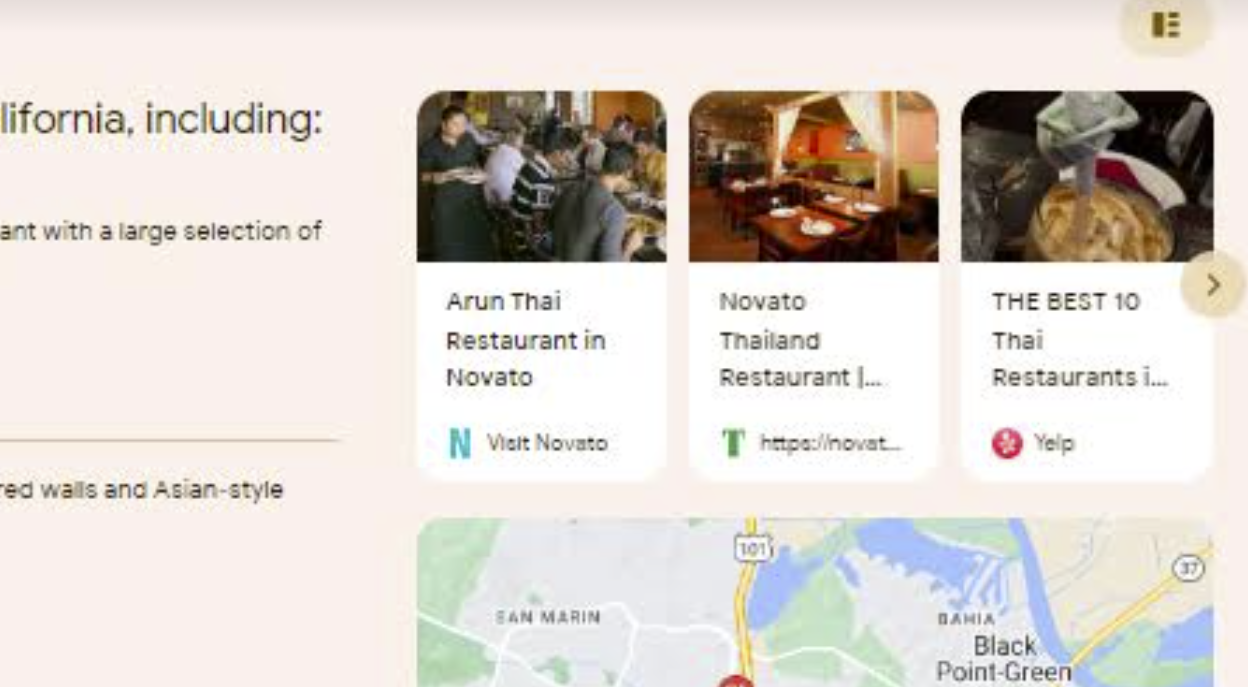
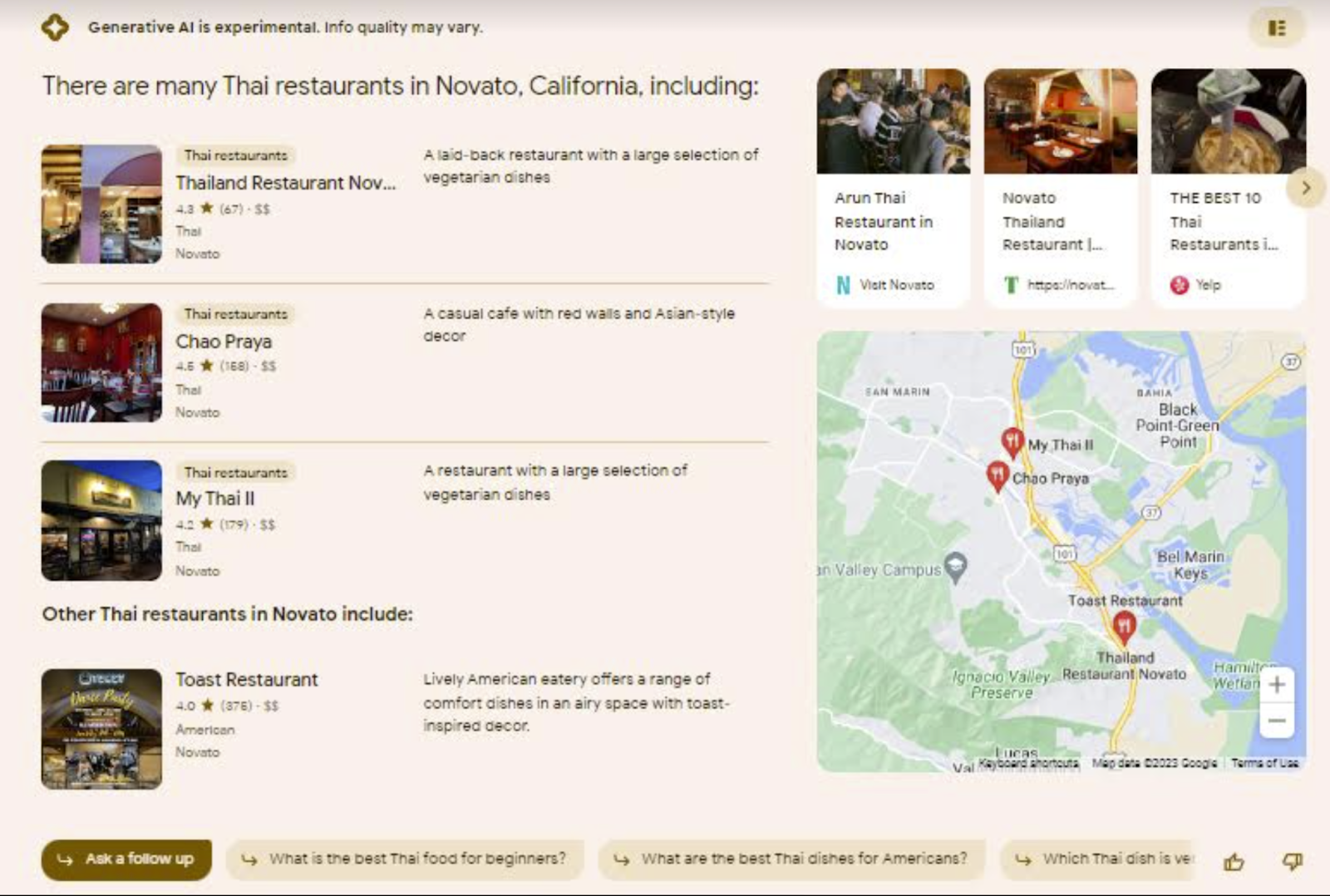
SGE pack listing Thai restaurants in Novato. The pack consists of a list of 3 businesses followed by a fourth business. There are photos, a map, a carousel of links to other sources and a set of buttons prompting the searcher to ask further questions.

100% of my keyword phrases (things like pizza, women–owned cafe near me, and bookstore in San Francisco) returned a local pack, signifying that Google recognizes their local intent, but of those searches:

  • 10% returned no SGE display

  • 34% returned a “generate” button to prompt to SGE display

  • 56% auto-generated an SGE display without prompting

Takeaway: At this stage, Google isn’t sure whether users will automatically want SGE for everything or only as an option for some searches.

How many SGE results included an SGE local pack?

While 100% of my searches yielded a traditional local pack outside the SGE display:

  • Only 77.6% of the SGE results included a local pack

  • 22.4% resulted in an SGE display of something other than a local pack

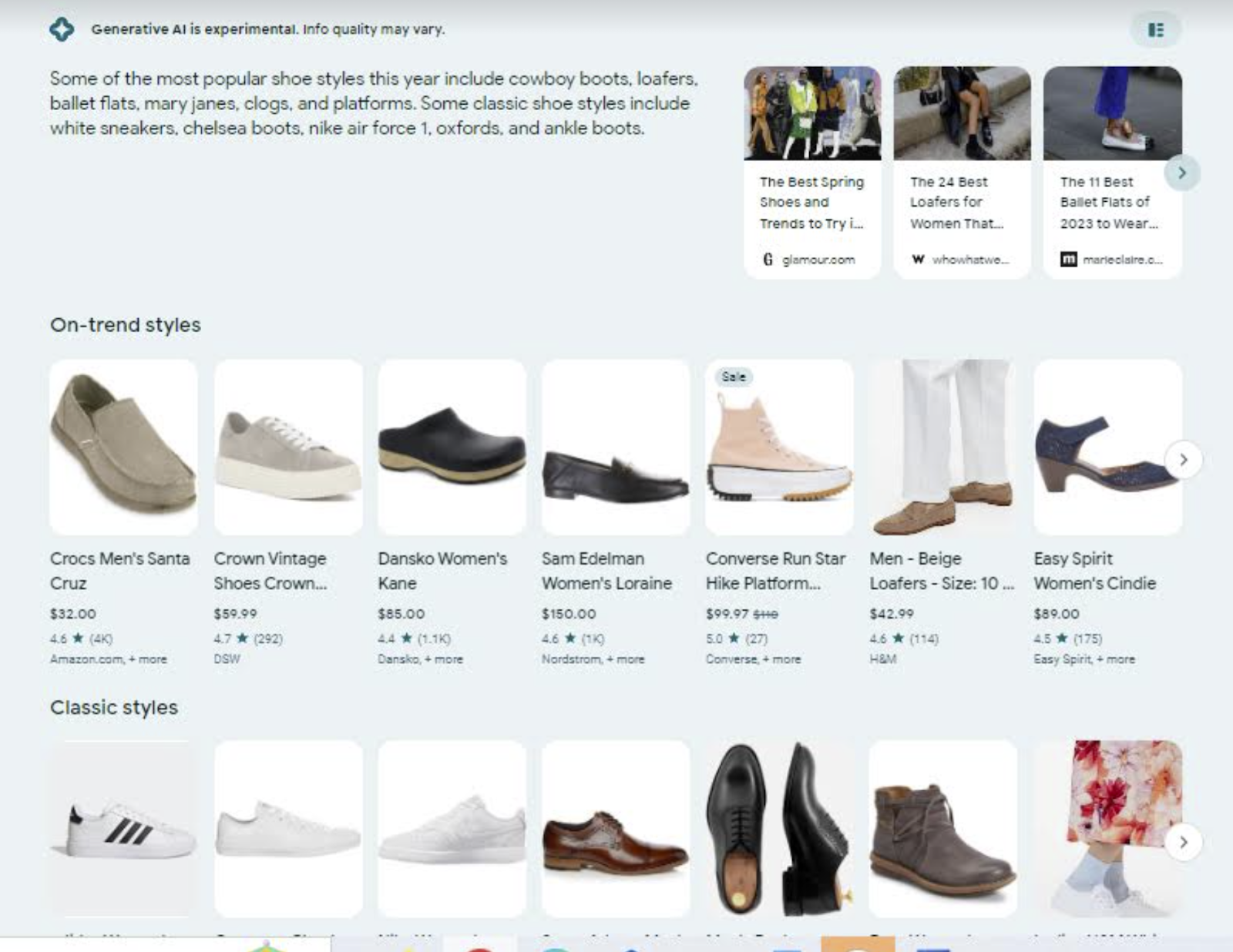
For example, most of us would expect a search for “shoes” to generate a local pack in Google’s interface these days, but here we see this SGE result, instead:

SGE result showing shoes shopping results

Similarly, we’ve been trained by Google to think we only need to type “Catholic churches” into a search box to be shown houses of worship near us, but SGE provided this very broad definition instead of any type of local result:

SGE result showing a lot of generic information about the Catholic church plus a carousel of links for more information and buttons to prompt the user to ask more questions

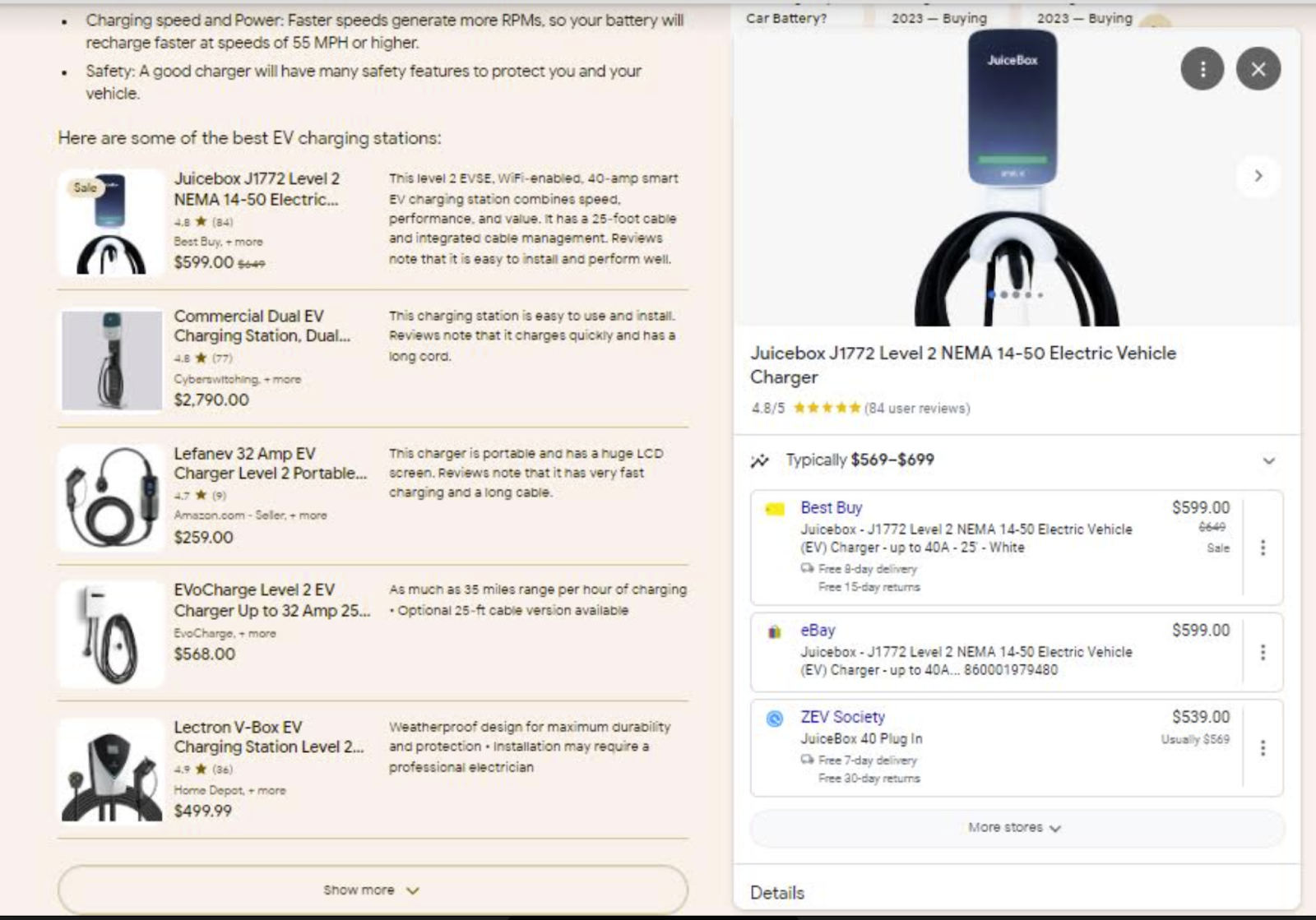
And SGE is really taking a surprising view of my intent in looking up “EV charging stations”. Instead of showing me a pack of nearby places where I can charge my electric vehicle, I’m being shown products to purchase:

An SGE result showing home EV chargers instead of local public charging stations

When clicking on these products, I’m given an interstitial card of places to buy these products, like eBay and Best Buy, which feels quite remote from my intent:

a card within an SGE result featuring products at online and offline retailers

Takeaway: There is a different logic powering SGE than what we’ve become accustomed to in pre-SGE Google. This may impact both your keyword research and your local search marketing strategy. Just because a search used to be perceived by Google as having an obvious local intent that would then be reflected in the SERPs returned, that doesn’t mean that the same logic applies in what SGE thinks your intent is. You’ll need to re-study the SERPs for your core keyword phrases if SGE rolls out broadly and is adopted by your customers.

The big question: Do SGE packs match traditional local packs?

a side-by-side comparison showing how SGE pack results do not match local pack results

The short answer is a decisive “no”. In my case study, 62.8% of SGE packs did not exactly match the contents or precise ranking of traditional local packs. That’s right, well over half the time, SGE rankings are different from local pack rankings.

As seen in the above side-by-side comparison, the SGE pack has a completely different business in first place, and the ranking order of restaurants 2, 3, and 4 is in a different order than its traditional local pack analog. These are significant differences for the businesses involved and one is left wondering why that #1 spot is being awarded to an eatery that isn’t strong enough to make it into the familiar local pack.

Takeaway: While I observed many instances of overlap of pack contents between SGE and traditional SERPs, the % of differentiation means that your traditional local pack rankings in no way guarantee the same spot in SGE’s recommendations. You’ll need to study and audit your SGE competitors separately if SGE rolls out to the public and is widely adopted.

How many businesses are included in SGE local packs?

Once upon a time, Google’s local packs contained 10 results. Imagine! Then we had 7. Now, we mostly have 3. SGE packs have their own variation. In my study, I found that:

  • 46.6% have a 5-pack

  • 22.2% have a 4-pack

  • 4.4% have a 3-pack

  • 4.4 have a 2-pack

Takeaway: In 68.8% of SGE packs, more local businesses are being displayed that would be shown in a traditional 3-pack in the organic SERPs. This provides more opportunity for you to be visible without a searcher having to click through an initial interface to something secondary like the Local Finder.

Is there an escape route out of SGE, and what about the ongoing importance of links and citations?

In my June live-tweeted thread documenting my first encounter with SGE, one of my first reactions to the interface was that it felt very enclosed. The SGE packs don’t click to the Local Finder or Google Maps or the reviews interface, making me feel sort of stuck. No matter where I was clicking around in the results, I was kept within the walled garden. Since that first experience, I’ve realized that the local version of SGE does contain an escape route in the form of these carousels to the right of the SGE packs:

a carousel of external links and citations in an SGE local pack result

In my case study:

  • 53.3% of the carousels linked to Yelp

  • 6.6% linked to Wikipedia

  • 4.4% linked to TripAdvisor

  • 4.4% linked to YP

  • 15.5% linked directly to brands’ own websites

  • 8.8% linked to a local informational site, like local online tourism sites or online local travel magazines

  • There was also a smattering of Facebook, Michelin, UberEats, GrubHub, and Superpages

  • This did not come up in my study, but I would like to anecdotally mention that in playing around with SGE, I am seeing a lot of citations of LinkedIn. Local businesses that don’t yet have a Linkedin profile should consider creating one.

Takeaways: Your structured citations in the form of formal local business listings still matter very much in the SGE setting. Your unstructured citations in the form of mentions on relevant local and industry sites still matter, too. The number of direct links from these carousels to local business websites is quite meager, and I would like to see Google reconsider this.

At any rate, there is some escape from SGE to third-party destinations, but here’s what I really want to emphasize:

  • 100% of SGE results containing SGE packs include carousel links to local.google.com

When moused over, these bring up a local.google.com URL, including a Place ID, like this:

screenshot of a URL bar containing a local.google.com subdomain

I was puzzled at first by that local.google.com subdomain. I feel like I hadn’t seen a URL from Google like that in a long time, but when clicked on, these types of URLs in the SGE carousel redirect to a google.com/search URL and this familiar display:

the local.google.com URL redirects to a google.com organic SERP

Takeaway: I could be 100% wrong about this, but looking at the way SGE is currently structured makes me feel like it’s not the ultimate way this will work. As it currently is, you’re already sitting right above the organic results while in SGE, and then there are these tiny cards in the carousel taking you back to the organic results, and the paths just feel a bit bewildering. So, while I like the escape routes out of the confines of AI, there’s something non-intuitive about the CTAs in these SGE packs.

What about local attributes in SGE?

I’m sorry to report that the work you’ve put into adding excellent attributes to your Google Business Profiles to serve specific customer intents seems to be wasted when it comes to SGE at this point. If you’ve taken the time to proudly add self-selected attributes like Black-owned or women-owned to your profiles, these results may let you down. Here’s a side-by-side comparison of my search for “women-owned clothing store Novato”:

traditional local packs show attributes like women-owned but SGE packs miss the nuance of this language and show stores for women instead

The traditional local pack tells me my intent will be met at these two stores on the left with their clear women-owned attributes. On the right, though, SGE is apparently ignoring my modifier and just showing me women’s clothing stores, which may or may not be owned by women. The nuance is being lost. This made me lack confidence in using SGE to search for other businesses with particular attributes.

Takeaway: This version of SGE is coming off as a bit less “smart” about local nuances than the local results to which we’re accustomed.

How standardized are the results when SGE thinks your intent is local?

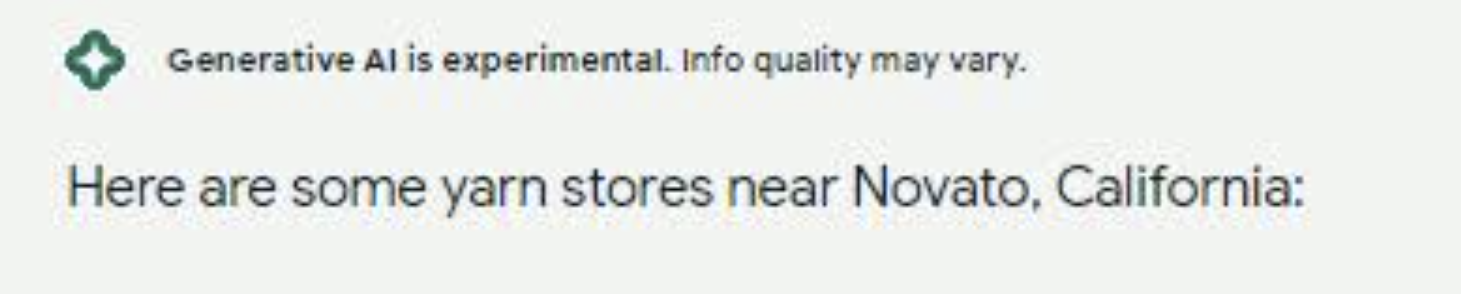
The answer is not very standardized at all. There’s something very vague and Google-y about the fact that some packs are headed with a simple message like “There are lots of yarn stores in Novato” or:

a common intro to the SGE pack uses language like "Here are some yarn stores near Novato, California"

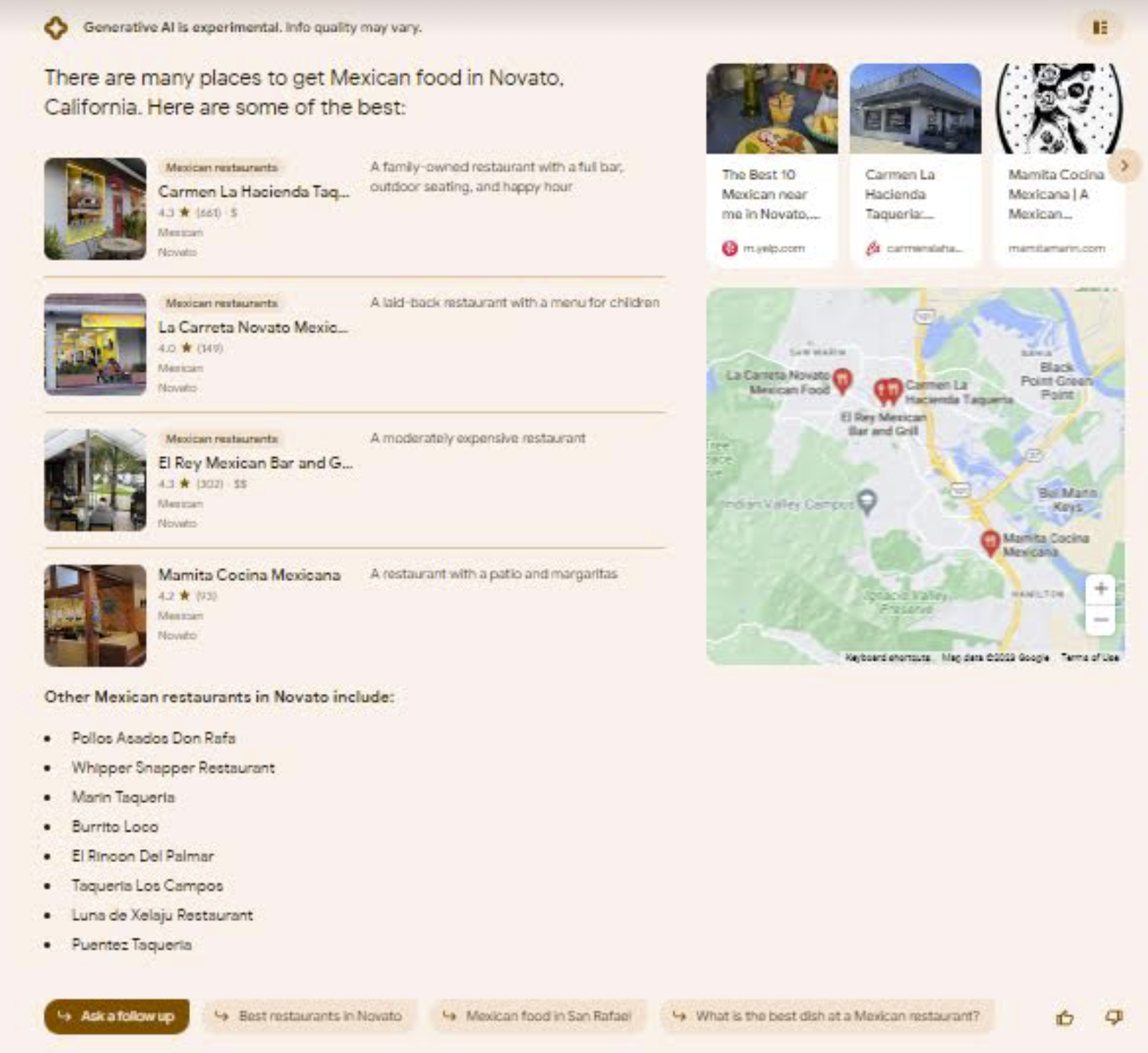
Whereas, for quite similar queries, Google suddenly wants to tell me a bunch of other information, which, quite frankly, seems rather random. A lookup of nearby Chinese restaurants generated a long list for me of people’s favorite Chinese takeout dishes (which I hadn’t asked about), and look at this example for Mexican restaurants. Explain to me the logic behind a 4-pack (when there are clearly enough choices for a 5-pack) being followed by a list of non-clickable “other” restaurants. What am I supposed to do with that list? What’s the CTA?

this SGE pack contains a seemingly useless list of additional restaurants you can't click on or see

Another odd variant I encountered more than once is this one, where the “other” restaurant is clickable but, for some reason unknown to me, is being portioned off outside the other results. Why Google, why?

this SGE pack showcases three businesses normally, but then adds a fourth business separately for no apparent reason.

We won’t even get into the fact that Toast is not a Thai restaurant and is characterized (categorized?) right there in the results as an “American” eatery. So what is it doing there, being labeled a Thai restaurant? Ah, well.

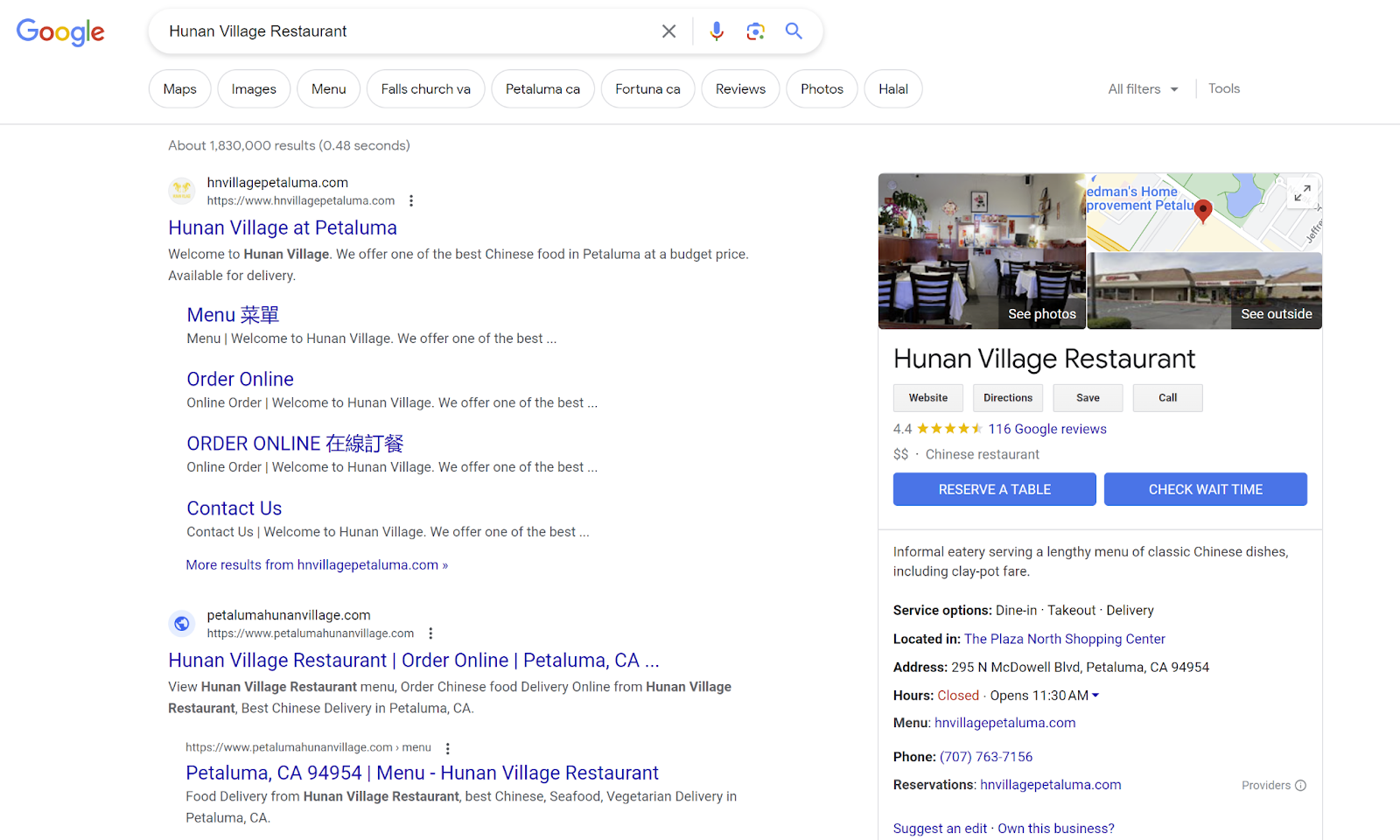
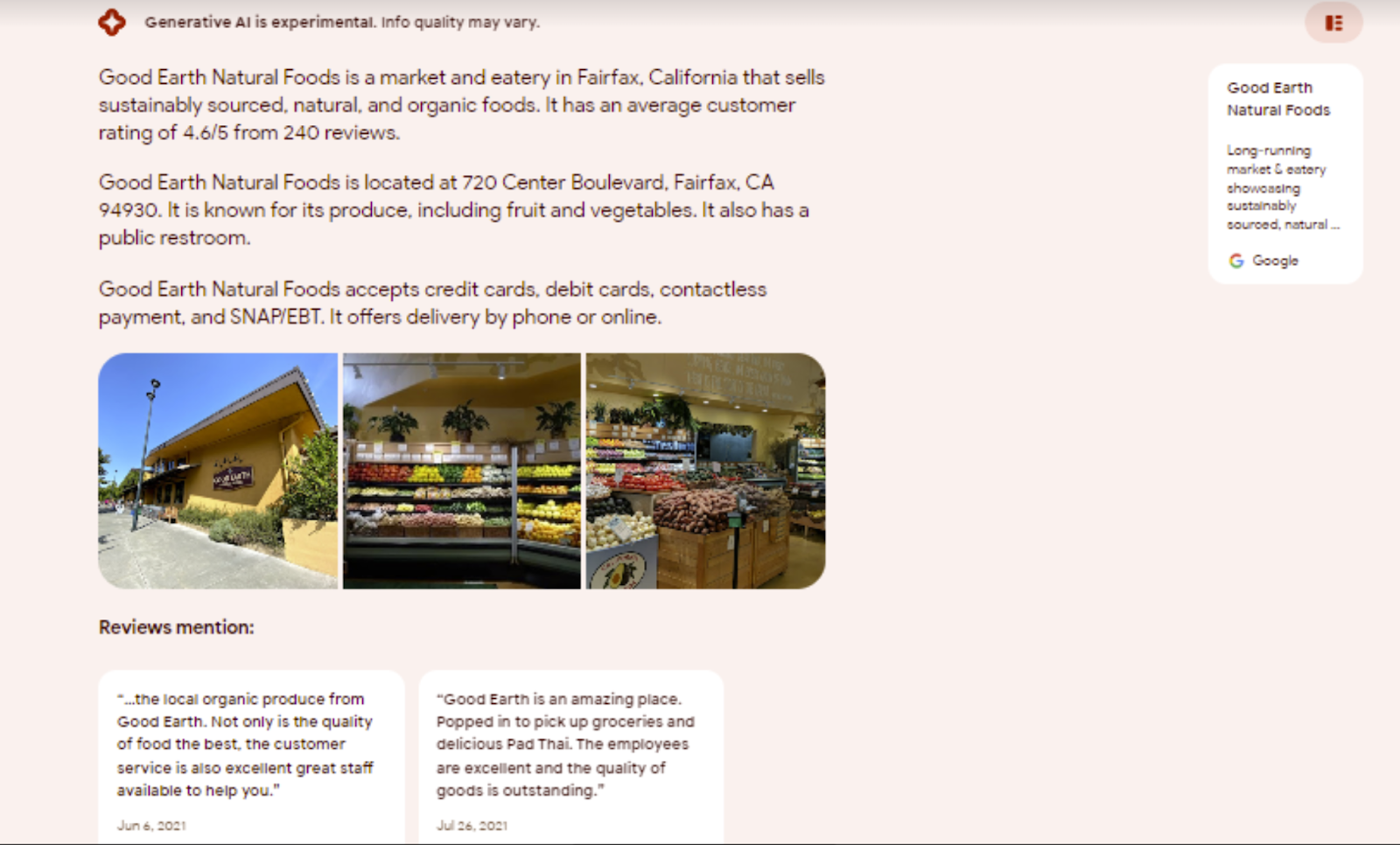
Meanwhile, local business owners will likely be most curious to know how they appear for a branded search in the SGE world. Typically, you’ll see yourself presented like this, with location info, a descriptive summary, some photos, a couple of review boxes, and one of those local.google.com links:

for branded searches, an SGE result can contain a summary description, location information in paragraph form, some phots and a couple of reviews

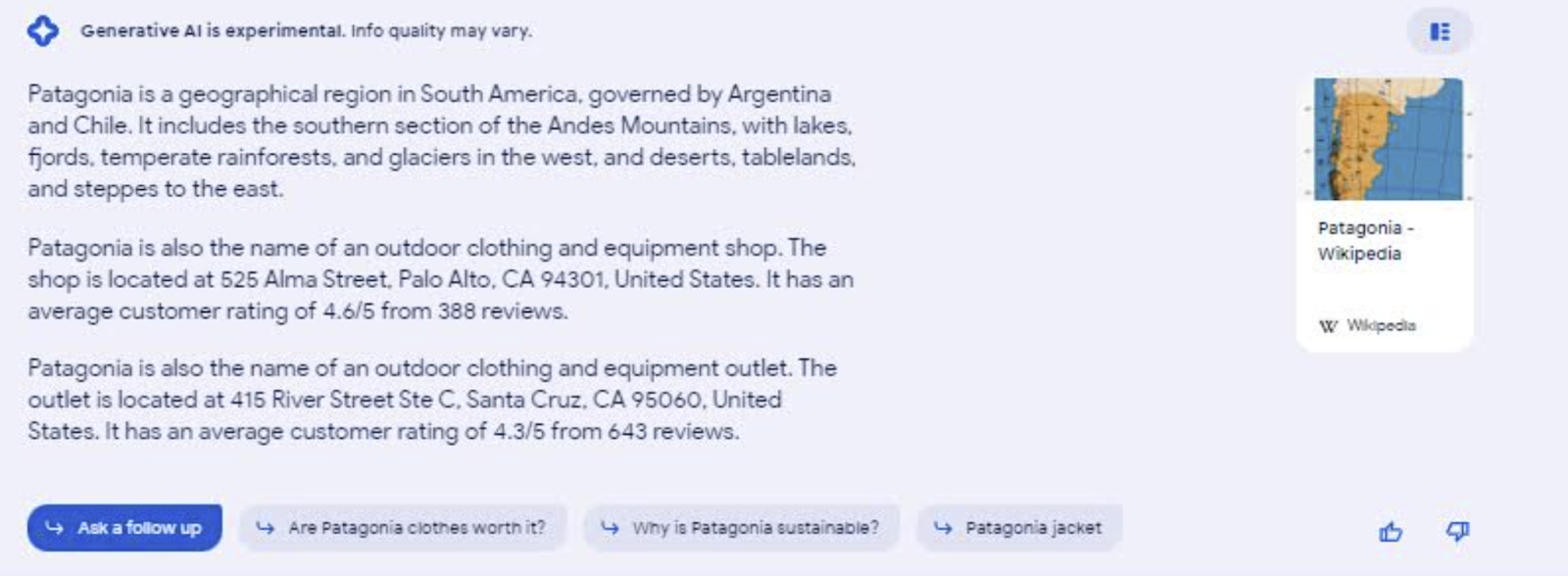
Unless you have that special misfortune of having branded your business something that defies Google’s intent logic, as in the case of the great brand, Patagonia. SGE is uncertain as to whether I’m searching for a store or a geographical region here, and I get this:

a search for patagonia reveals SGE's uncertainty as to whether the intent of the search is to find a store or read about a geographic region

Takeaway: As we can see, there is not strong standardization across SGE at this point, and while in some cases, you’d think time might yield a more uniform presentation, I wouldn’t count on it with Google. Traditional local search has changed continuously over the past two decades. Branding, features, pack counts, guidelines, and mysterious ranking logic are all in flux, all the time. I would expect the same from SGE, necessitating ongoing study.

SGE packs vs. local packs: which is better?

I may have oodles of objectivity from studying Google’s local results for nearly 20 years, but this opinion is entirely subjective: right now, SGE is simply not providing as good of an experience as traditional packs and GBPs for basic local search functions. Why do I say this?

  1. If I just want to see an actionable set of local businesses, local packs are faster to access and easier to understand in terms of layout.

  2. SGE is a whole new interface for people to learn without any obvious added benefit to learning it. I did not get into asking SGE further questions in this case study because such activity isn’t basic to basic local search. I want to talk directly to the business after finding it online – not to a bot, given that I have no idea how current its information is.

  3. I really don’t like that I don’t get a review interface when clicking on the reviews portion of the SGE pack. It almost feels like an error that nothing comes up.

  4. I am really surprised by, and not a fan of, the map disappearing when I click on one of the results. How can it be that Google, which has based its entire local search enterprise out of Google Maps, is letting maps take such a backseat in the local SGE interface?

  5. The SGE results for branded searches in no way touch the depth of information provided by a direct look at a Google Business Profile. If Google is betting that people would rather see a bare-bones summary than a novel full of info, then maybe this approach will be popular, but I am not wowed by what I am seeing as the SGE replacement for a GBP. It feels very empty.

  6. Looking at a branded SGE result really makes me wonder about the pressure for conversational search to become ‘a thing’. Local search has accustomed us to getting the name, address, phone number, and hours of operation in a neat little package, nicely organized, almost like a list. If you go back and look at the branded SGE result for The Good Earth Market, Google is expecting you to read through paragraphs of text to find this information. In many ways, local search has been like a giant experiment in shorthand, giving you quick data at a click so that you can make fast decisions. Conversational search presumes you want to read a lot and talk a lot before finding a place for a fast box of tacos. Conversational search is a real 180, and I have to wonder if, like voice search, it will struggle to find the kind of use cases that lead to longevity.

  7. I remain unconvinced that AI, in general, is a natural match for local search. The introduction of an AI-based review filter has caused havoc in local business reviews, and I feel that this movement towards automation simply takes us further towards a virtual world and further away from the local world that local searchers want.

Takeaway: Do your own research and monitor your presence in SGE to see how it evolves. Be wary of hype. Every new thing that is being launched in the AI era comes with claims that it will “change the world forever.” Wait, watch, and see, and keep working on the things that you know work in local.

source https://moz.com/blog/sge-local-search-data

Categories
Digital Marketing

How SEOs and Developers Can Work Better Together

This is part one of a three-part series with Helen Pollitt on how to work better with folks within your company.

SEOs and developers need to work better together. Understand how to communicate with each other in a way that fits into each other’s processes. By doing so, you can safeguard your organic traffic while also safeguarding your entire website.

Digital whiteboard of how SEOs and developers can work better together

Click on the whiteboard image above to open a high resolution version in a new tab!

Video Transcription

Hi, I’m Helen, head of SEO at Car & Classic, and today we’re going to look at how SEOs and developers can work better together. Now, I’d spend some time explaining to you why developers and SEOs need to work better together, but it’s kind of obvious really. Developers have the opportunity to make our lives so much better by quickly implementing that fix to load speed or making our lives so much worse by accidentally rolling out some code that completely de-indexes the website.

But actually, we can really help developers as well because we have the opportunity to give them data into usability and accessibility. It’s actually quite important that we work well together. Now, you often hear people say that if you want to get on well with your developers, you need to bribe them with doughnuts, which is a little bit insulting and a lot expensive because who has that kind of doughnut money just hanging around?

But actually, we need to work out how we can form a really good working relationship with developers that doesn’t rely solely on baked goods. How do we do that?

Understand processes

Understand processes

Well, first off, we need to start by understanding their processes, because essentially if we’re asking them to do things for us, we need to make sure that we are communicating in a way that fits into their processes.

So learn how to brief in your requirements in a way that helps them to prioritize and plan your work. So what is it that they do at the moment? Do they have a ticketing system that they use that they put all of their requirements in, and it allows it to be monitored as it moves through the process? Or do they have some other way that they track the work that they’re doing? But make sure that you are putting in your requirements and your requests in the format that works for them.

There’s no point just shooting over an email to them, asking them to fix something if it doesn’t actually make it into their work. So what else do you need to do? You need to look at where you have briefed things in the past and it’s not really worked out well. So perhaps mistakes were made, there was a misunderstanding, a problem with communication. Have a look through some of the tickets that you’ve submitted in the past and look to see whether there are reasons why they got rejected or misunderstood.

What do you need to do to clarify things when you’re briefing in work for your developers? Perhaps you can look at other teams and what they do when they are briefing in work for the developers. Maybe you can understand how they are structuring their tickets or whether there’s a particular terminology they use to help communicate things to the devs better. But learn from where other people are doing it better as well as where you’ve not done it so well in the past, and hopefully you’ll come up with a really good way of helping your developers understand what work you want them to do.

Look at things like their work cadence. So do they commit to doing work two weeks in advance? Do they commit to a whole month worth of work before they get going? Or do they have some slightly confusing mix of agile and waterfall that essentially means no one knows what work they’re doing, but it has to be done right now? Whatever way your developers have their work planned in for them, make sure that you are aware of it because that cadence is going to be really important.

If you want something done and you need it done soon, then you’re probably going to have to see if you can get it prioritized in order for it to be in this sprint or the next sprint, for example. You want to know what kind of time frames that they’re working to. How much time is your ticket going to take? So if you’ve asked them to do something really complicated on the website, it’s going to take a lot more time, testing, and resources for that to actually be rolled out.

So make sure that you’ve got that planned in for your own schedule of work. Finally, what you do if everything explodes on the website and you need to get it fixed right now? So say the entire website has been de-indexed somehow. Are you supposed to just put a ticket in and wait for two weeks for the next sprint for it to get fixed? That doesn’t sound like a good idea. So how do you escalate when there are some real serious, critical issues that you’ve identified?

Do you have to put a ticket into a different work stream? Do you have to talk to someone in particular about it? Do you just have to run around the office screaming a little bit until someone pays attention to you? What is the way that you get your tickets escalated at your company or at your client’s company?

Train colleagues in SEO

SEO training

Next, look at some training. What are the common things that your developers run into when they are being asked by the SEOs to implement work?

So are there problems with pagination often that you’re asking them to fix, or they’re implementing links in a way that isn’t particularly SEO friendly? Can you just train them in this kind of stuff in advance so that they are already equipped to know how to do things from an SEO perspective, rather than waiting for you to say, “You did that wrong”? Maybe you can put together a repository of these documents. So actually, why don’t you write this kind of stuff down?

So whenever you tell someone how to implement pagination in an SEO-friendly way, write it down, give the context of what it is that you asked them to do and how that was fixed, so that they can refer back to it, other members of the team can refer back to it, and actually all the SEOs are on board and making sure that they are recommending the same ways of working in the future. If you want to train your developers, they’re busy.

They’re busy people. They might not have an hour or two hours for you to go through the intricacies of how websites are crawled by search engines. Is there an alternative way that you can train them? Look at things like, how do they train each other actually? Do they send over videos? Do they write it all down? Do they have a real quick 15 minutes distilling of information?

How do they train each other? How do they upskill themselves? See if you can conduct your training in a similar way.

Get an SEO Q&A process in place

SEO QA process

Really important to making sure that you’re working well with your developers is getting some kind of SEO QA process in place. So this means things like being tagged in the tickets that are being taken through the development process. So it might be that developers aren’t aware of things that could be affecting SEO, and therefore if they can just tag you on the tickets, you can go in and check to see whether there’s any SEO impact or any input that you need to have.

You can also assign a point person. So perhaps there’s a project manager or there’s an engineering lead within the development team that you can always go to and make sure that you have an SEO that they can always come to. That way, you’ve got a point person, a point of contact between both teams, so whenever there is any kind of confusion or discussion around tickets or priorities, they’re getting one message from one person and you’re not confusing the situation with lots of voices all chipping in.

Make sure whatever happens, you have the authority to stop something being rolled out. Make sure that you’ve spoken to the right stakeholders so that you have that authority to say no to something being implemented, because it’s all very well being tagged in a ticket or being told of future developments, but actually, if you’re not allowed to say, “Hold on, we need to change how we’re implementing this,” then it’s kind of useless and a waste of your time.

Ultimately, you don’t want something to get rolled out that is going to have a really negative impact on your organic visibility just for it to have to get fixed or rolled back at a later date. You want to be able to say no before it’s rolled out in the first place.

Get buy-in from your developer team

Getting buy-in

Last up, how do you get buy-in from your development team? Well, I once gave a survey to a whole bunch of developers asking them what they needed from the SEO team to work better with them, and of the two developers that actually responded to my survey, they both said they wanted more context around the tickets that we were putting in.

They want to know why we’re asking for stuff, not just what it is we’re asking for. So if you’re asking for your developers to implement hreflang tags on a website, make sure that you are telling them why. What is it that you are trying to end up with? What do you want from the hreflang tags? So that they understand the context and they can perhaps suggest better ways of doing things, or they can make sure that wherever they are implementing SEO changes is not negatively affecting the website in other ways.

Our job as SEOs is to safeguard organic traffic, and their job as website developers is to safeguard the entire website. So they probably want to know why we’re making changes so that they can check it’s not going to have any adverse effects. Make sure you understand their ways of working. So if they like to communicate through emails or instant messaging services, or perhaps they like to only communicate about tickets within the ticketing system itself, so they’ve got a nice audit trail that anyone can refer back to, try and make sure that you’re working in a similar way so that your recommendations and your advice and your questions don’t get missed.

If they’re only checking the tickets to see what people are commenting on or asking and you’re sending the emails through, then chances are that the right people aren’t going to see the things that you’re commenting on. Try and get yourself an SEO champion, and this is kind of good advice for any of the teams that you’re working with, but make sure that you have a person within the development team or your client’s agency that really wants to know more about SEO, that really gets SEO and wants to improve their understanding of it, because if you have someone who’s really keen to learn more, perhaps they did SEO a bit in a previous job or they just have an interest in it, then you’ve got a person who’s probably going to be on your side when you are asking for things like changes in ways of working or for a whole new process to be implemented.

If you have a champion, someone in the development team that wants to learn more from you, that you can perhaps mentor a bit in SEO, then you’re going to have someone who’s really keen to help you. Look at the tools and data that you have access to as SEOs that your development team doesn’t, and see whether there’s data they’d actually find quite valuable. Yes, they can interrogate a database, but they don’t necessarily have the tools to crawl a website in the same way that we do, for example, and it might be that they want to find information and understand how a search engine is perceiving something.

So you can either train them in using things like Google Search Console, or you can give them access to the data instead. But make sure that you are communicating with them the data that they will find useful because it’s a great way of getting buy-in. Show them the results of their work. So if they have done something that’s greatly improved Core Web Vitals, show them. They’re going to want to see all the green ticks just like we do.

So maybe you can communicate and give updates regularly to the development team after they’ve completed a ticket of what impact it had. Maybe it improved rankings. Maybe it helped with usability. What is it that their work did that had a very positive effect on SEO? You can even go as far as giving them scores and feedback on it because they want to learn, they want to get better at their jobs, and if SEO is a part of that, then you kind of need to give them feedback so they know where to improve.

So thank you so much for listening. I’m going to go and find myself a doughnut. Is there a doughnut shop? Have you got a doughnut shop around here?

Video transcription by Speechpad.com

source https://moz.com/blog/seos-and-developers-working-together-whiteboard-friday

Categories
Digital Marketing

How to Combat SERP Volatility

Have you ever lost keyword rankings and felt a sudden wave of panic?

If so, you’ve likely been on the wrong end of SERP volatility, meaning periods of extreme fluctuation in keyword rankings.

But before you go into optimization overdrive without any concrete strategy, the most important thing to remember is to take a deep breath and not panic.

In fact, SERP volatility is a normal part of today’s highly competitive world of SEO.

So once you’ve collected yourself, take time to analyze your data, pinpoint the cause, and make changes to content (or sometimes not), with full confidence.

To help you understand how to do such an analysis and optimize content with the best possible chance of stabilizing keyword rankings, let’s now take a deep dive into SERP volatility.

What is SERP volatility in SEO?

SERP volatility occurs when SERPs change based on various contexts. Occasionally, extreme fluctuations in both the positive (a higher ranking) and the negative (a lower ranking) direction can occur. It’s extremely normal nowadays, because there are millions of websites competing for top ranking positions.

To make things simple, think of SERP volatility similar to stock market volatility. It can all change even within a single day and that’s not necessarily something to automatically fret about.

Why SERP volatility impacts SEO performance

While one small loss in keyword rankings might not have a major impact on SEO KPIs and performance, if things start to add up and many keyword rankings are lost – especially if they’re revenue-driving keywords – that’s when you’ll want to take a deeper look at the data.

When this happens, your entire business objective to generate traffic and increase revenue from SEO grinds to a halt. If pages don’t rank, you don’t get the clicks or the conversions, leading to losses in new leads and sales.

Here’s a visual summary to give you a better understanding:

Infographic summary of SERP volatility

So as you can see, keeping an eye on changes that are needed is crucial, which is why content optimization is so important for long-term SEO success.

8 Reasons for SERP volatility and how to combat it to maintain keyword rankings

The best possible way to combat SERP volatility is to review data to determine the root cause.

When reviewing data, ask yourself:

  • What keywords are experiencing the most volatility?

  • What content is ranking, and then not ranking for those specific terms?

  • Are there any underlying technical errors that are impacting SERP results?

Try to drill down and pinpoint what is causing all the instability in your rankings. Then, you can implement the appropriate changes and monitor how those changes affect performance.

Now, let’s break down some of the most common issues that trigger SERP volatility and ranking fluctuations, as well as proposed solutions for how to fix them.

Reason 1: Mixed search intent, SERP variety

Mixed or vague search intent means that the search engine is unclear how your content addresses the query in the search bar.

Let’s use the example of a B2B tech firm called Healthcare IT.

When entering the query “healthcare IT” into search engines, here’s the top result that appears on the page:

News search intent:

Screenshot showing news search intent for the keyword 'healthcare IT'

Consulting search intent:

Screenshot showing consulting search intent for the keyword 'healthcare IT'

Government database search intent:

Screenshot showing government database search intent for the keyword 'healthcare IT'

So you can see from these examples that many types of content appear (SERP variety) because Google isn’t precisely sure what the user is searching for (mixed search intent).

How to combat SERP volatility for mixed or vague search intent

Mixed search intent is one of the most common reasons for SERP volatility. The good news is that it can be resolved entirely, so unstable keyword rankings don’t become a recurring issue. The solution involves specifying intent through your own keywords within the content. For example, if your page is all about “healthcare IT news,” specify that on-page by using keywords that include ‘news’ rather than just having ‘healthcare IT’. This way, it’s easier for Google to determine the type of intent you’re targeting so that it can show the correct content to the user.

In order to identify and monitor whether you’re impacted by this issue, consider if the keyword and the intent behind that keyword has changed. Keep track of keyword ranking averages across 3 – 6 months to monitor how people search for and engage with queries in SERP results. Remember that daily fluctuations in results are inevitable, so a better strategy is to monitor monthly fluctuations to identify trends.

Additionally, always keep an eye on new SERP competitors. Are there new players in the market with compelling reasons to rank for those same terms? If so, you may need to implement a content refresh as explained above to get your rankings back on track.

Reason 2: High keyword difficulty

This is another common reason for SERP volatility. There are billions of web pages competing for top SERP positions and the organic traffic they deliver. This high level of competition creates “keyword difficulty.” If you’re targeting keywords with high difficulty, it can be relatively easy for competitors to bump you down from high-value positions without warning.

Have a look at this example of a search for this high difficulty keyword: “SEO beginner guide.” The data is pulled from Moz.

Screenshot of Moz Pro's Keyword Explorer results for the keyword 'seo beginner guide'

Now, here’s a list of some of the sites that appear in the results. They’re constantly changing positions from week to week, largely due to content refreshes.

Screenshot showing websites that rank for the keyword 'seo beginner guide'

How to combat SERP volatility for high difficulty keywords

Similar to this example, check to see if your competitors have recently optimized or refreshed their content.

Furthermore, you also need to consider the authority of your own website. If your keyword rankings were high, but have stayed at a constant low later on, consider if your domain has the authority to own the search term as competition has grown.

A great way to check this is with Moz’s Keyword Explorer tool, which allows you to compile lists of keywords where you can compare keywords against each other by search volume and difficulty. So if you see that a keyword has become too difficult due to high competition, you may consider using a lower difficulty keyword that’s easier to rank for.

Ultimately you’ll also need to decide how much of a priority ranking for that term is important for your business. If it’s of high value, try optimizing your own content to gain greater visibility. If it’s not of high value, it’s probably worth letting that one go.

Reason 3: High market competition

This is a similar challenge to the previous one. Your competitors, with directly or indirectly competitive products, may be investing a lot into new content creation. As they produce new fresh content, signals are sent to search engines that their sites have something of value to provide to audiences.

Due to the frequency and quality of their publishing strategy, they’re constantly gaining topical authority around the subject matter. Over time, the cumulative effects of their content strategy translate into higher topical authority that helps to elevate their site rankings.

How to combat SERP volatility for high market competition

The solution here is a simple matter of monitoring your competitors and what they’re doing. Identify what content they’ve recently published that seems to be gaining the most traction.

Then, determine how you can create something of a similar nature but with a unique spin that provides even greater value to your competing audience. In the example above, this came in the form of regular content refreshes related to industry trends and algorithm updates.

You’ll also want to ensure that your entire content architecture works together to build topical authority over time, which will help you stably rank for high difficulty keywords.

Reason 4: Trending topic

Let’s use a very topical example to explain this one. Recently, the search term King Charles gained a lot more search volume, which is understandable in light of the recent coronation.

However, prior to his ascension to the throne, the term King Charles had more to do with dogs rather than the newly crowned king. Notice the change in intent?

Screenshot showing the search results for the keyword 'king charles'

Sometimes, a trending topic can cannibalize the focus of a particular keyword. You either need to come up with a whole new SEO strategy to shift the focus and recapture the intent of that term, or you need to decide if it’s still worth the effort.

How to combat SERP volatility for trending topics

Work around the hijacking of that specific term by instead investing in long-tail keywords. While long-tail keywords do have less search volume than broader generic terms, the intent behind long-tail queries is much more specific on the part of the audience.

Someone who searches for a phrase like “how do I use technology to manage healthcare” is looking for a more specific answer than someone who simply searches for “healthcare IT.” Decide if playing the long-tail game is worth shifting focus away from shorter head keywords.

Keep in mind that this approach could drop your organic traffic volume. On the other hand, it should drive up CTRs and conversion rates because those who do find you want what you can offer. So in the end, focusing on long-tail will result in stronger revenue results from SEO.

Reason 5: Indexing issues

Here’s where we get into more technical SEO challenges. Sometimes, your on-page SEO could be top-notch, and the content you’re creating is fully optimized for the appropriate keywords. Yet, despite your best efforts, the results aren’t coming through.

If this is the case, you likely have some technical problems with your site, and your indexing issues could be where the trigger for SERP volatility lies.

How to combat SERP volatility for indexing issues

The first step to solving this challenge is to run an audit using GSC or another SEO tool, such as Moz Pro’s Site Crawl. Identify the pages that are being improperly indexed so that you can isolate them from the search engines.

Screenshot of the tool Google Search Console, showing pages that are not being indexed

These technical glitches typically occur during a site migration, page optimization, or site structure changes. If you’ve recently undergone one of these technical updates, speak with your developers to figure out how best to fix the problems.

Reason 6: Google A/B testing SERPs

Sometimes, the direct cause of SERP volatility has little to do with your SEO or your business model. In certain periods of time, Google is simply reevaluating what appears in specific SERP results.

This is particularly common when trending topics emerge for certain search terms. A perfect example is the term “ChatGPT.” Since its launch in 2022, there have been thousands of news articles written about the impact the AI algorithm will have on content creation.

Each one of those news updates receives higher ranking authority because it’s discussing the latest trend about a new market offering. Google will run A/B tests on its own SERP parameters to ensure audiences receive the most relevant information as new updates are announced.

How to combat SERP volatility for Google’s A/B SERP testing

The best approach is to monitor rankings using your site analytics. Keep track of keyword ranking averages over a span of three to six months and evaluate the impact of the fluctuations on performance.

If you notice a big change, that’s a signal that your site content needs to be optimized to regain authority for the appropriate terms.

If the impact is minor, you may just need to take a wait-and-see approach. Watch the changes carefully and see if Google pushes you back up to the top of the rankings. Also, remember to check your analytics data to determine if the UX could be a cause for reduction (for example, look at bounce and exit rates to see if people are abandoning your site as soon as they arrive).

Reason 7: Algorithm changes or penalties

Periodically, Google and other search engines will announce sweeping changes to their search engine ranking algorithms. Some of these updates, like Google Panda, can change the entire nature of how search engines index and rank specific websites. Others are minor tweaks to the algorithm with less permanent SERP volatility.

If you’ve noticed trending topics on social media about search engine algorithm updates, look for discussion threads about the recent changes. Another nifty way to monitor algorithm updates is by keeping an eye on the Moz Google Algorithm Update page. You’ll be able to determine if the problem lies with your site or if this is an algorithmic update that’s affecting everyone.

Here’s an example of a site that was negatively impacted by the overuse of AI generated content.

Example of a website negatively impacted by the overuse of AI generated content

Important note for this example: Using AI to write content doesn’t automatically mean you’ll get a penalty – but spamming does.

How to combat SERP volatility for algorithm updates or penalties

Do a little research into the algorithmic update itself. Try to ascertain what specific feature the new algorithm is impacting to get a better sense of how your site will fare.

You may find technical problems with your site that impact performance, such as:

  • Site speed

  • Topical authority

  • Domain authority

  • Quality of inbound links

  • Etc.

Also, remember to go back into GSC and run your own site audit to see if there’s anything specific that may be weighing you down. Find the culprit and erase it, so you can get yourself out of “Google Jail.”

Reason 8: Cannibalization

If you’ve created content with headings that are similar to each other and have focused on the same intended search terms, you may be sending confusing signals to search engines about what content to feature for the appropriate keywords. This is when the concept of “content cannibalization” comes into play, meaning where multiple pages could rank for the same keyword, and Google is unsure about which one to show.

A perfect example is if a CMS brand tries to rank for “headless CMS.” They used the phrase “headless CMS” on:

  • The homepage (to describe their product)

  • A blog with the URL blog/what-is-headless-cms (a more insightful piece on the topic)

  • A blog with the URL blog/headless-cms-advantages (a second thought leadership piece about the same theme)

Where the issue lies is the fact that they have used multiple pages to cover similar topics, so the keyword rankings for these pages were constantly changing.

How to combat SERP volatility for cannibalization

Make sure you always refer to your keyword map when building out new pages. Your keyword map should be your singular source of truth to help you build out and connect different web pages around an umbrella topic.

Ensure that you’re not creating duplicate content or targeting similar search terms with multiple variations of content. Keep things structured and organized so that you avoid ending up on the wrong side of Google’s algorithm updates.

If you do find content that’s live and is cannibalizing, like the avoid example, consider condensing the pages into one or doing a redirect to the primary page to rank.

To combat SERP volatility: don’t panic, review the data, and optimize with confidence

Remember that the best thing you can do when you notice keyword rankings suddenly drop is not to panic. Take the time to analyze the situation and drill down to the root cause.

Panic optimizations help no one and can even cause more harm than good. Once you dive into the data, you’ll know what changes are appropriate (if any). Map out the best course of action and plow full steam ahead to get the ship back on course.

When you keep important keyword rankings, your SEO performance stays strong, and so too are the conversions generated from it!

source https://moz.com/blog/combat-serp-volatility

Categories
Digital Marketing

Why SEOs Need to Embrace AI

It’s no question that the AI conversation has dominated the SEO community during the last year. The implications of this new technology are both extremely exciting and a little scary at the same time. At Go Fish Digital, we’ve been following these trends closely and refining our processes around the possibilities that AI brings.

Within both the SEO and larger technology communities, there is a huge discrepancy of opinions.

Many are weary of the implications and skeptical on the long-term benefits for marketers.

Some believe that this is a passing trend similar to voice search.

Others believe that this is a revolutionary technology that will impact every aspect of search in the future.

Out of curiosity, I performed a poll on my Linkedin page. I asked if SEOs thought that ChatGPT was going to disrupt SEO:

A poll on LinkedIn on the impact of AI in SEO

Nearly two-thirds of respondents said that ChatGPT is going to change our industry. I tend to agree with them. As a community, we need to be getting prepared for the imminent changes that AI is going to bring.

SEOs need to embrace AI

I believe that as a community, we need to be paying attention to this generational technology. While the tools certainly have their shortcomings, the outputs they’re producing already are nothing short of impressive. These tools will allow us to become more educated, more efficient and more technical.

It’s important that we not only keep in mind where these technologies are today. We must understand and expect that these tools will get exponentially better over time. The performance of GPT-4 is already significantly improved from GPT-3.5

Thinking about a 5-year time horizon, these tools will advance far beyond what we’re seeing in today’s versions. This is why SEOs need to be adopting these technologies right now. The ones that do, will be well-positioned for the future of marketing.

Improving our SEO efficiencies

Back in March, I was curious as to how many SEOs were utilizing ChatGPT in their day-to-day workflows. Despite the fact that it was relatively new, I wondered how quick SEOs were to adopt using it:

A poll on LinkedIn on how marketers integrate ChatGPT in their day-to-day work

To my surprise, 52% of respondents already claimed to be using ChatGPT to help with regular SEO tasks. This poll was conducted just 3 months after it’s initial release.

This makes sense as there are a lot of really great use cases for SEO tasks that we do on a daily basis. By using AI technology like ChatGPT, you can significantly improve the efficiency at which you’re able to work on some of these tasks.

A simple example is keyword research. With ChatGPT, you can immediately create large seed lists of potential keywords that have semantic relationships to the core topics that your website is trying to compete for.

Tom Demers recently wrote a great guide on Search Engine Land where he walks through his process of using AI for keyword research. In the guide he shows multiple examples of how he was able to use different types of prompts to directly identify keywords or find sources to mine for query opportunities.

He even showcased how he was able to export data from third-party SEO tools and bring it into a table format within the ChatGPT interface:

ChatGPT integration with third-party SEO tools

Content ideation is another great example of a tactical task that ChatGPT can leverage. Here I prompted ChatGPT to give me 30 different topic ideas about “The Metaverse”. It delivered them in about 30 seconds:

Prompting ChatGPT to give topic ideas for content.

If I ran a technology blog, I could vet that against existing content on the site and find gaps where search opportunities might exist. Even if there was no direct SEO value, these topics still help position us as a topical authority in a particular content area.

You could even use ChatGPT to optimize your site’s content at scale. Tools such as GPT For Work allow you to connect to Google Sheets to the ChatGPT API. This allows you to feed in dynamic prompts and get the output back in Google Sheets.

As a result, you could create thousands of title tags and meta descriptions. You could give a site a baseline level of optimization with about 30 minutes of setup:

Using Google Sheets with the ChatGPT API to create title tags

From a tactical perspective, there are so many use cases for ChatGPT to help with SEO.

  1. Keyword research

  2. Content ideation

  3. Content evaluation

  4. Schema generation

  5. Featured snippet creation

  6. Title tags and meta descriptions

  7. Ideas for new content sections

  8. Readability improvements

While there are many resources available, Alyeda Solis wrote a fantastic guide on the different use cases for SEO.

If you’re performing SEO in any capacity, it’s very likely that you can find a use case where your day-to-day efficiencies can be improved by utilizing some of these processes. This will allow us to produce a more efficient output and spend time working on initiatives that are less prone to automation.

Enhancing our knowledge base

I believe that only looking at strictly tactical implementations would be using AI far within its limits. There are many other great applications for the SEO community beyond that.

One of the best use cases that we see many industries using ChatGPT for is to enhance their knowledge base. AI can be an excellent teacher when prompted correctly. It can summarize information exceptionally quickly and give it to us in an output that’s completely customized to our learning style.

For example, the late-great Bill Slawski used to analyze patents that Google filed for. These patents are more technical and Bill used a long-form writing style.

Bill Slawski's patents

We started testing running Bill’s patents through ChatGPT and prompted it to summarize core points. A successful prompt was “Summarize the whole article in 5 bullet points. Explain like I’m in high school”:

Asking ChatGPT to summarize an article

For my learning style, this allowed me to get enough detail to understand the patent and its implications without having the output oversimplify Bill’s ideas. If I was curious about any given idea, I could simply prompt ChatGPT to elaborate more and it would allow me to go deeper.

You could also get summaries from Google’s documentation. Here I fed it text from Google’s page on canonical tags and asked it to give me best practices.

Asking ChatGPT to summarize a page

How many of us struggle with technical SEO, web technology or understanding how search engines work?

With ChatGPT the work of great technical minds like Bill and Google’s documentation essentially becomes democratized. Now when you encounter an SEO topic that you don’t understand, you can use AI as a teacher.

Of course, there are drawbacks to this. These types of summaries might not fully represent an author’s work as content must be left out and elements such as tone of voice aren’t taken in to consideration.

However, as a whole, this is a very powerful thing. Now the knowledge base that exists around SEO is more accessible to the entire community.

Empowering a community of creators

Personally, I think the most exciting aspect of the implications of AI for the SEO community are the technical possibilities that it opens up. While many of us are technically minded, not everyone has a background in development.

ChatGPT is going to enable the SEO community to become creators.

With the right prompting, you’ll now be able to create code that you weren’t able to before. That’s going to significantly impact your effectiveness as a search marketer.

For example, Screaming Frog is now opened up so much more for SEOs. I recently needed to scrape the BreadcrumbList structured data of REI’s site. When doing similar tasks before, it’s taken hours of debugging, re-running crawls and even meetings with other members of our team.

I asked ChatGPT to create a Screaming Frog extract and fed it sample HTML. Within 5 minutes, I was able to get a working XPath that allowed me to extract exactly what I needed:

Asking ChatGPT to create a Screaming Frog extract

The process could be applied to many other tools. ChatGPT could help you create API calls, SQL queries, Python scripts and many other things. This will empower the community to create new things that might not have been possible for many people.

On top of one-off pieces of code, you’ll now be able to create tools that are fully customized to your exact needs.

I’ve never created a Chrome extension before. However, ChatGPT has the power to take the prompts you give it and turn it into a fully functioning extension.

With about 30 minutes of prompting and debugging, it was able to create a custom SEO extension that pulls data such as title tags, meta descriptions, H1s, URL and more:

Creating a custom SEO extension using ChatGPT

While there are great tools like this available, I could customize this extension to the exact specifications that I want.

You can even create tools that help improve your SEO efficiencies. My colleague Dan Hinckley was able to further iterate on this extension.

By connecting it to the ChatGPT API, he was able to create an SEO extension for our team that provides recommendations for title tags, H1, new content sections, and more:

Now this gives the entire team at Go Fish Digital a new tool to use as part of their process. We can quickly find page-level SEO opportunities and can decide which ones are worth actioning on for a given recommendation.

I suspect that ChatGPT will produce other solutions similar to this in the community. By embracing the power of AI, SEO teams will be able to identify the needs that they have and create a solution that perfectly fits their internal processes.

Conclusion

To us, it’s clear that AI is going to have a significant impact on the SEO community. The data already shows that SEOs see these technologies as having the power to significantly disrupt the industry and are already incorporating tools like ChatGPT into their day-to-day processes. I believe the SEOs that adapt to these changes will be the ones that see the most success.

Marketers that are able to leverage AI to improve efficiencies, grow their knowledge base and build customized solutions to improve their processes will be well-positioned for whatever the future of search holds.

Chris will be speaking at MozCon 2023 this August in Seattle! Join us for inspiring sessions with our incredible lineup of speakers. 

We hope you’re as excited as we are for August 7th and 8th to hurry up and get here. And again, if you haven’t grabbed your ticket yet and need help making a case we have a handy template to convince your boss!

Register for MozCon

MozCon SEO conference 90%  sold out

source https://moz.com/blog/seos-need-to-embrace-ai

Categories
Digital Marketing

Diversify Your Content Strategy Whiteboard Friday

Go from basic to a more advanced content strategy with Azeem in this Whiteboard Friday episode. Diversify your content strategy by creating the right content for your audience at the right time.

digital whiteboard image describing how to diversify your content strategy

Click on the whiteboard image above to open a high resolution version in a new tab!

Video Transcription

Hi, everyone. My name is Azeem. I’m the host of the “Azeem Digital Asks” podcast, and I’m here to show you a very brief whistle-stop tour of how you can diversify your content strategy on this Whiteboard Friday.

3 examples of where marketers get measurement wrong

3 examples of where marketers get measurement wrong

So I’m going to start off and make a very bold statement as a bald man and say that I think that we, as marketers, get measurement wrong, and I’m going to give you three examples here.

So if you are measuring brand awareness, for example, there are a number of things that you can measure, such as downloads, traffic, referrals, mentions. If you look at engagement as a key KPI, you’ll be looking at things like links, likes, comments, shares, retweets, all that sort of stuff. For lead gen, you’re typically looking at MQL, SQL, subscriptions, and call backs. So it’s three very quick examples of how I think we get measurement wrong.

Create an advanced content strategy

how to create an advanced content strategy

When it comes to our audience, I think we know what they want, but we don’t know how they want it, and I genuinely think that the internet is in a position now where hit and hope with just purely written content doesn’t work anymore. I genuinely think the internet has moved on. So I’m going to show you a very brief way of how you can take your content strategy from basic to even better to hopefully advanced, and that starts with this.

I think a lot of marketers are in the basic section, and that is where you have a particular topic, topic X as I’ve listed there, and that is your framework for the rest of your content. So if you were talking about trees, for example, you might have trees as your topic, and that would be the framework to branch out and create even more of topic around trees to move on.

That’s fine. That’s where I think a lot of marketers are. The better version would be looking at UA, universal analytics or multi-channel funnels, understanding what performs well, and creating more content of that based on where your audience is in the purchase journey. Then the advanced version would be looking into GA4, splitting out your top five markets as I’ve put there, understanding how they perform with a data-driven attribution model, and creating the right content for the audience at the right time, the Holy Grail of what we are trying to achieve here.

How to use this information

examples of advanced content

I’ll give you four examples of how you can actually use this information and take it away, and literally from tomorrow you can be able to improve your content strategy. So example 1 would be let’s say you have set up scroll tracking and YouTube view measurements on your GA4. Layer the two together.

You can understand how, for example, your audience in France will be engaging with your content in the sense of how far do they scroll down on a page and how much of your videos on your page they are watching. Example 1 would be a particular audience that scrolls not a lot, but engages with video quite a lot. In which case, I would introduce very early on in the page long-form videos.

You know what your audience wants. Don’t make them work for it. Don’t make them scroll down the page, because you know what they want. Make it as simple for your audience as possible. Example 2 would be the opposite, where you know your audience will scroll quite a lot, but you know that they won’t watch the videos that you put on the page. In which case, you can create highly-detailed content and then utilize remarketing to bring them back to your website.

The third example would be if you have an average scroll and an average video time, but a high ASD, which I have peddled as average settle duration. These are people that I call page hoppers. They’re very likely going to be in the research stage of their journey, of their purchase journey. So this is where you want to focus on your brand and why you stand out against the rest of your competition.

The fourth example would be people who don’t scroll and don’t watch your videos at all. I think in that situation you’ve very clearly got a disconnect, but there is still an opportunity for you to introduce short-form videos earlier on in the purchase journey. Utilize this information, find out which one of the four you sit in, and use that to create your content strategy in a more diverse way by including audio, snippets, video teases of varying different formats, and I guarantee you’ll be onto a winner and have more success with your content strategies moving forward.

I hope that in this very short video you’ve taken something away. You can find me on social media @AzeemDigital. If my SEO is any good, you should be able to type in “how can I contact Azeem” and you’ll come across my website. Very much enjoyed being here. Thank you for having me, and I’ll see you soon.

Video transcription by Speechpad.com

Azeem will be speaking at MozCon 2023 this August in Seattle! Join us for inspiring sessions with our incredible lineup of speakers.

We hope you’re as excited as we are for August 7th and 8th to hurry up and get here. And again, if you haven’t grabbed your ticket yet and need help making a case we have a handy template to convince your boss!

Register for MozCon

MozCon SEO conference 90%  sold out

source https://moz.com/blog/whiteboard-friday-diversify-content-strategy

Design a site like this with WordPress.com
Get started